Is Ubuntu Completely Bloated?
Short answer: Ubuntu got heavier, but "bloated" is only half true. The recommended hardware went up, and some design choices cost you RAM and disk. But a lot of the weight is optional, and you can see exactly where it goes with a few commands.
In this post: why Ubuntu grew, the actual numbers for the current release, how to check what's eating your machine, how to slim it down, and when you should just switch to a lighter flavor.

The Growing Pains of Ubuntu
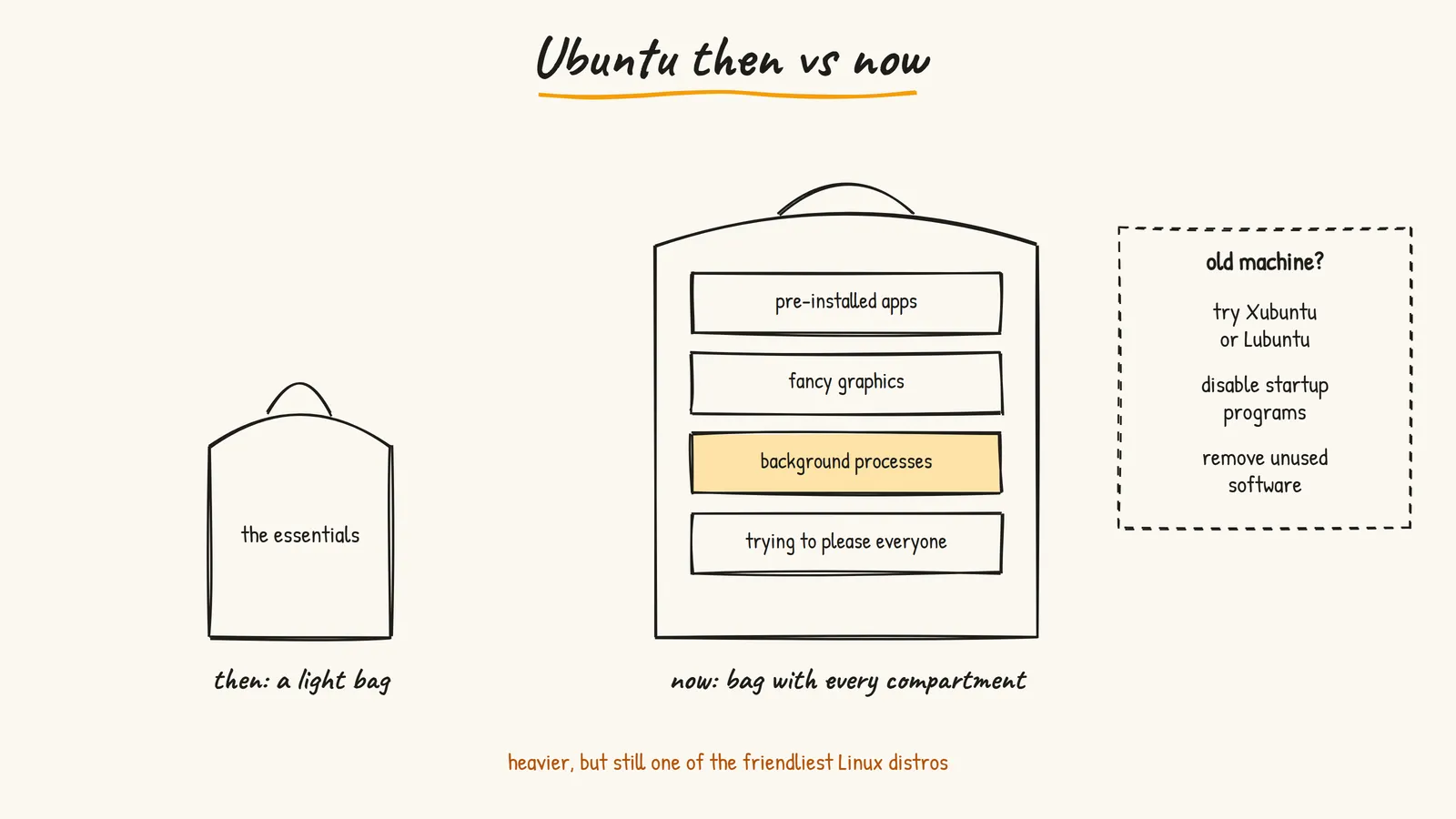
Think of Ubuntu like a backpack. When it started, it was a small bag with just the essentials. Now it's a travel bag with extra compartments, built-in chargers, and who knows what else.
Why Does This Happen?
- More features. Nicer animations, a polished desktop, more things working out of the box. All of that costs memory.
- Trying to please everyone. Ubuntu wants to work for students, designers, developers and people who just want a browser. Supporting everyone means more services running in the background.
- Modern hardware expectations. Most new machines have plenty of RAM, so there's less pressure to stay ultra-lean.
The Actual Numbers
Here's what Canonical says you need, straight from the official pages:
- Ubuntu 24.04 LTS: 2 GHz dual-core CPU, 4 GB RAM, 25 GB disk
- Ubuntu 26.04 LTS (the current LTS): 2 GHz dual-core CPU, 6 GB RAM, 25 GB disk, "for a comfortable experience"
So the recommended RAM went up by half between two LTS releases. The desktop ISO download is now 5.9 GB for 64-bit PCs. That's the honest case for "Ubuntu got heavier."
The installer itself will still boot with about 1 GB of RAM. That's the bare minimum to install, not a number you want to live with.
Where the Weight Actually Goes
"Bloat" usually means one of three things, and they need different fixes.
Snaps
Ubuntu ships some apps as snaps, including Firefox by default. Snaps bundle their own libraries, so they use more disk than a normal package, and the first launch can feel slower. Snap also keeps the previous version of each app around so it can roll back a bad update, which doubles the disk cost of every snap.
Background services
The GNOME desktop runs a bunch of helpers: file indexing for search, update checks, online accounts, and more. Each is small. Together they add up on a 4 GB machine.
Pre-installed apps
This part actually got better. The newer Ubuntu installer gives you a leaner default selection, and the extra stuff (office suite and so on) is an optional extended selection. If you picked the extended one, that's on you, not Ubuntu.
How to Check Your Own Machine
Don't guess. Open a terminal and look.
How much memory you have and how much is used:
free -hWhat's slowing your boot, slowest first:
systemd-analyze blame | head -15Which snaps you have installed:
snap listHow much disk snaps are using:
du -sh /var/lib/snapdAnd for a live view of what's eating CPU and RAM right now, top works everywhere, or install htop for a nicer version:
sudo apt install htop
htop
If free -h shows you almost out of memory with just a browser and a code editor open, your hardware is the bottleneck, not a config setting.
How to Slim It Down
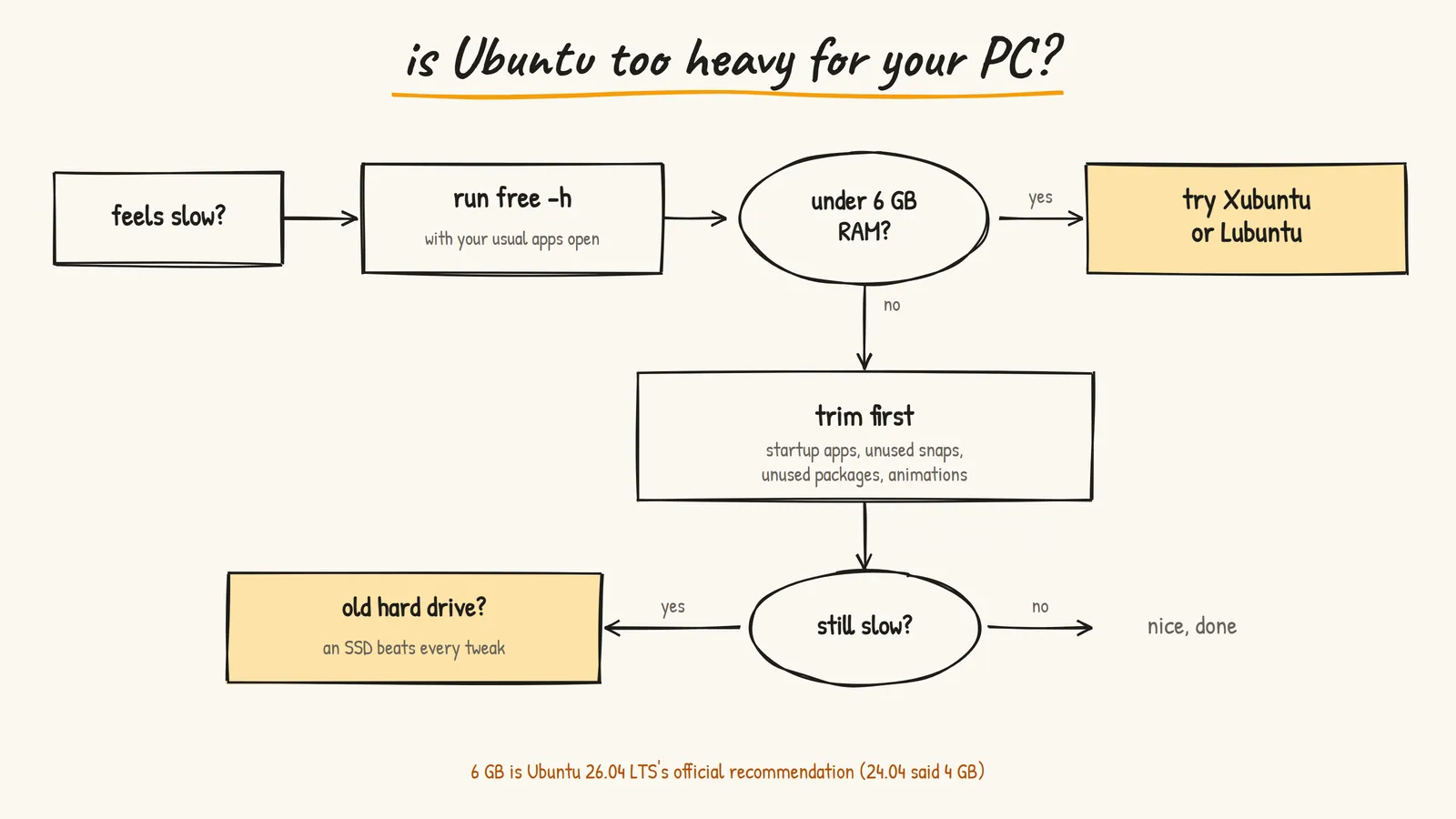
If your machine is fine on paper but feels sluggish, try these in order:
- Turn off startup apps you don't need. Check your startup and background apps (in Settings, or the "Startup Applications" tool if your version has it) and disable anything you don't recognize as essential.
- Remove packages you don't use, then clean up leftovers:
sudo apt remove <package-name>
sudo apt autoremove- Remove snaps you don't use. Every snap costs disk twice (current plus one old version for rollback). Snap already keeps the minimum of two versions on regular Ubuntu, so there's nothing to tune there. Just remove what you don't need:
sudo snap remove <snap-name>-
Tone down animations. Look for the reduce animations option under Accessibility in Settings. Small change, noticeably snappier on weak GPUs.
-
Check your disk. If you're still on a spinning hard drive, a cheap SSD will do more than every tweak on this list combined.
When to Switch Instead
If you're under the 6 GB recommendation, tweaking will only take you so far. Ubuntu has official "flavors" that use the same base and the same software repos, just with a lighter desktop:
- Xubuntu: Xfce desktop. Light, traditional, very stable
- Lubuntu: LXQt desktop. Even lighter, good for really old machines
- Kubuntu: KDE Plasma. Not the lightest, but very configurable. If you go this way and hit a black screen, I wrote about that fix too
Everything you learn on Ubuntu still applies. Same apt, same packages, same community answers online.
Is This a Bad Thing?
Not really. Most people prefer a comfortable, feature-rich car over a bare-bones one, and most people are happy with a polished desktop that works out of the box.
It's only a problem if your machine is old or low on RAM. Then you feel every extra service.
What I'd Actually Do
- Run
free -hwith your normal apps open - If you have 8 GB or more: keep Ubuntu, trim startup apps and old snaps, move on
- If you have 6 GB: Ubuntu works, but keep the browser tab count sane
- If you have less than 6 GB: install Xubuntu or Lubuntu instead of fighting it
- On any machine with a hard drive: get an SSD before you blame the OS
Final Thoughts
Ubuntu's growth reflects everything else in computing: always adding, rarely removing. It's heavier than it was, and the official numbers prove it. But it's still one of the most beginner-friendly Linux distros, and most of the "bloat" is something you can see, measure and trim.
Resources
- Ubuntu 26.04 LTS release notes - Official requirements for the current LTS
- Download Ubuntu Desktop - Current download and system requirements
- Xubuntu - The Xfce flavor
- Lubuntu - The LXQt flavor
- Kubuntu - The KDE Plasma flavor
- Prasenjit