I Built an App That Judges Your Life Decisions. Here's How Jev Works
"Should I text my ex at 2am?"
You type that into a notebook page. You hit a sketchy hand-drawn button. A torn piece of paper slides in with a marker bar at 10%, two stars out of five, and in big handwriting: absolutely not.
That's Let Jev Decide. I built it in one evening, starting around 7pm on a Monday and pushing the last commit a little after 1am. It's a toy. But it's a toy built on a kind of AI model most people haven't used yet, and building it taught me more about "AI in your code" than any chat app ever did.
This post is the whole story. What Jev actually is (in normal words), how the app is wired, the bug that made every answer "sleep on it", how I tuned the verdicts with real numbers, the share card rabbit hole, how I stopped people from burning my API quota, and the stuff that's still not good.
It's long. Grab a coffee. The card has a coffee stain anyway.
Two Days Earlier, I Didn't Know What Jev Was
I got an API key from TypeSafe on a Saturday. My first question to the agent in Cursor was basically "what is this jev". A few messages later I typed "i don't understand jev actually teach me in simple way".
So if you're confused right now, same. Here's the version that finally clicked for me.
What Is Jev, in Simple Words
Jev is an AI model made by a company called TypeSafe. It's their flagship, and their first "System One" model. The name nods to the idea of fast, gut-feeling thinking (System 1) versus slow, step-by-step reasoning (System 2).
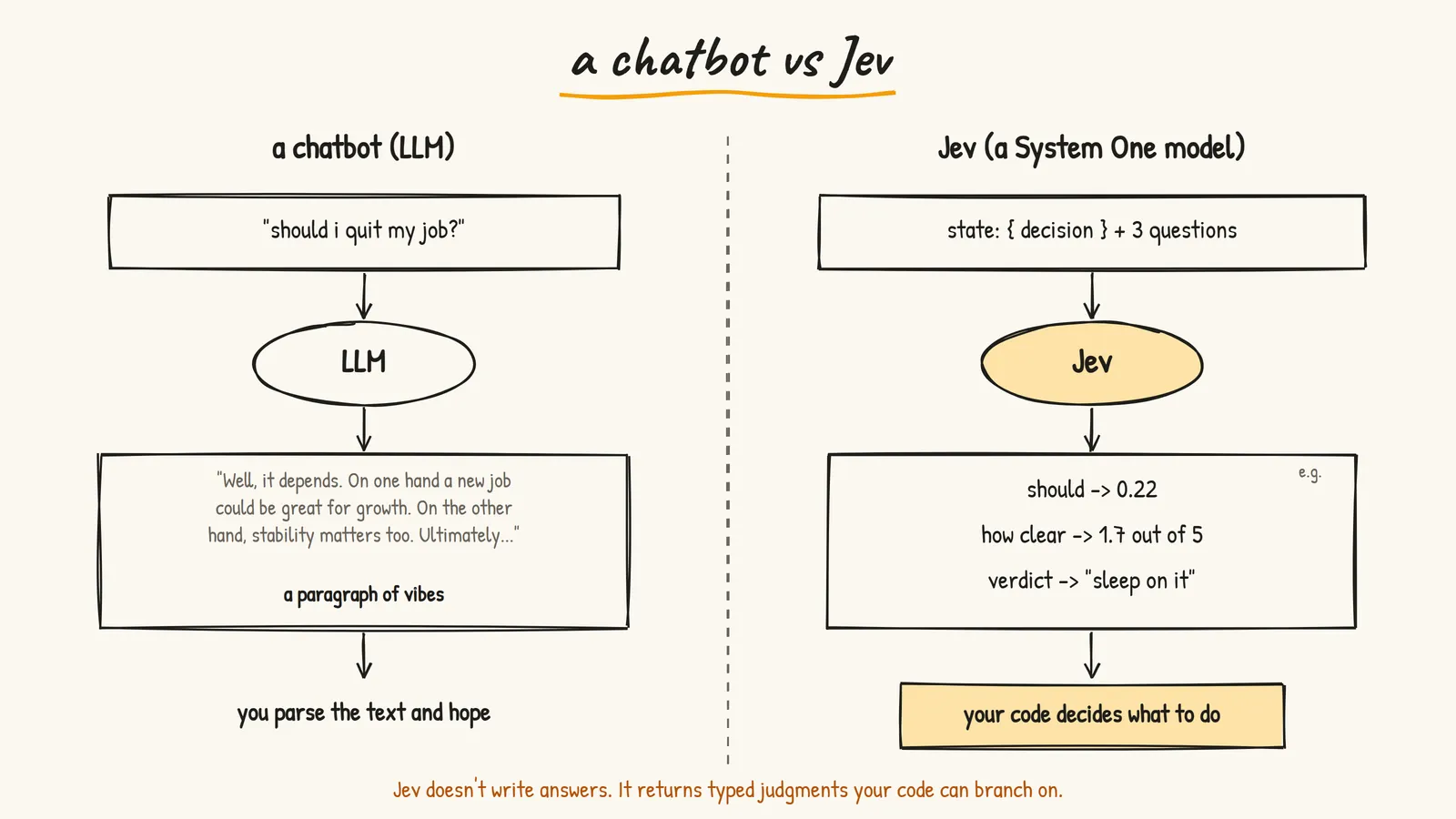
The important part: Jev doesn't write text.
When you ask ChatGPT or Claude a question, you get a paragraph back. Then your code has to figure out what that paragraph means. Regex, JSON mode, "please respond with only yes or no", prayers.
Jev skips all of that. You give it two things:
- State: the stuff it should look at. A string, or a JSON object with named fields.
- Questions: small, narrow judgments you want it to make about that state.
And it gives you back typed answers with probabilities. Not prose. Numbers and labels your code can use directly.
There are only three kinds of questions:
- Noul: "does this condition hold?" You get a probability of yes, like
0.92. - Score: "where does this sit on a scale I describe?" You get a position, like
1.6on a 0 to 2 scale. - Choice: "pick one of these options." You get the option plus how the probability spread across all of them.
The example that made it click for me was a support ticket. A chatbot is for "write a helpful reply to this angry customer." Jev is for "is this a refund request, which team should handle it, and how angry is this person?" Then your normal if/else takes over.
One line that stuck with me from the explanation: Jev adds human-like judgment to normal if/else code. That's it. That's the whole idea.
It's also fast and cheap. My very first smoke test resolved jev-latest to jev-1.13.0 and came back in about two seconds. My first two test requests together were 942 tokens and cost less than $0.0001. I had to read that number twice.
The Idea: A Notebook That Judges You
Once I understood Jev returns probabilities, the app basically designed itself. A "should I do this?" question is a perfect Noul. "How sure can you be?" is a perfect Score. "Do it / sleep on it / absolutely not" is a perfect Choice.
So I wrote a brief for the agent. One page. One text box. One button. One verdict. And a very specific look:
- Off-white, slightly yellow paper with ruled lines, like a notebook
- Everything handwritten (Caveat and Patrick Hand from Google Fonts)
- The input looks like writing on a ruled line, not a form field
- The button looks like a sketched rectangle with wobbly edges
- The probability bar looks like it was drawn with a thick marker
- The verdict is a torn notebook page, slightly tilted, with a coffee stain
- Tiny doodles in the margins
- Dark mode becomes a chalkboard
And a "do NOT" list: no login, no multiple pages, no UI library, nothing that looks corporate. The line I cared about most was "it should feel like a notebook you found on someone's desk."
I'll be honest about how this got built, because I always am on this blog. I wrote the brief and made every product call. The agent in Cursor wrote most of the code, read the TypeSafe docs before touching the SDK, deployed, and tested on production. I steered, pushed back, and said "no, revert that" a few times. That's how I build most things now, and the harness post explains why it works.
The Stack
Nothing exotic:
- Next.js 16 (App Router) with React 19 and TypeScript
- Tailwind v4 for layout, plain CSS for all the paper and ink effects
- @typesafe-ai/sdk for talking to Jev
- modern-screenshot to turn the card into a PNG in the browser
- next/og to draw the share image on the server
- @vercel/analytics for page views
- Upstash Redis support for a visitor counter (more on that later, it's not live)
- pnpm, and Vercel for hosting at jevdecide.vercel.app
The repo is private for now. The Vercel project is hooked up to GitHub, so every push to master goes live in about 30 seconds.
How It's Wired
The whole app is one page and three API routes. Only one of those routes ever talks to Jev.
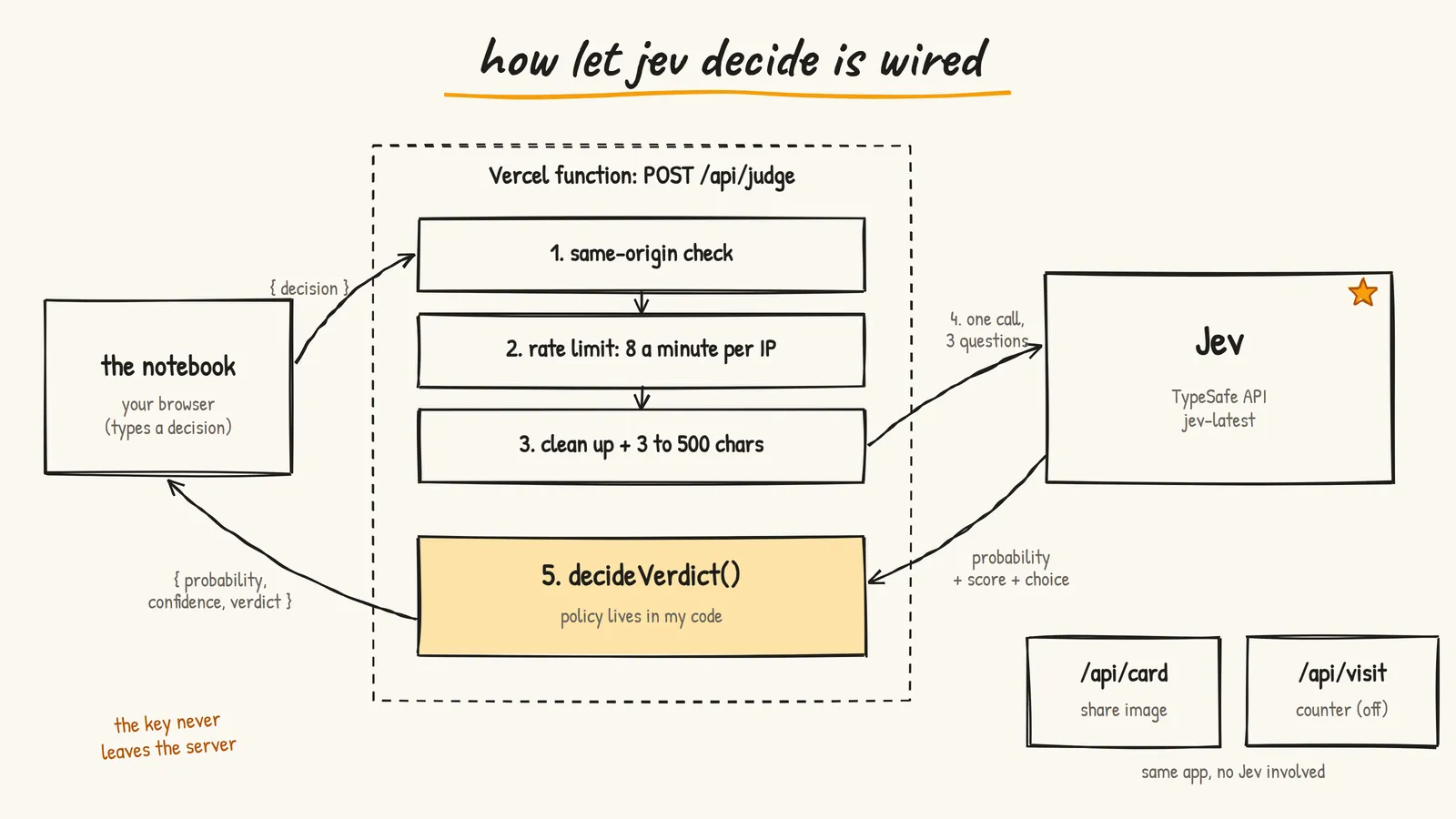
Here's the flow when you hit the button:
- The page sends
{ decision }toPOST /api/judgeon the same domain. - The route checks the request actually came from the page (same-origin).
- It checks you haven't asked more than 8 times in the last minute.
- It cleans up the text and makes sure it's between 3 and 500 characters.
- It makes one call to Jev with three questions.
- It turns Jev's answers into a verdict using rules in my code.
- It sends back
{ question, probability, confidence, verdict }and the page draws the card.
The API key lives only on the server. The browser never sees it and never talks to TypeSafe directly.
One Call, Not Three
My original brief said "three jev calls fire". That's how I imagined it: one call per question. The agent read the TypeSafe docs first and did it differently, because the docs are clear about this. Independent questions about the same state should go in one request. They run in parallel on TypeSafe's side and can't see each other's answers, which is exactly what I wanted anyway.
So the real call looks like this:
const response = await client.systemOne({
  state: {
    decision,
    note: "A person wrote this personal life decision and wants a snap judgment.",
  },
  questions,
});
decision is whatever you typed. The note gives Jev a tiny bit of framing so it knows this is a personal life question, not a support ticket or a product review.
The client itself is boring on purpose:
function getClient() {
  return new TypeSafeClient({
    timeout: 20_000,
  });
}
It picks up TYPESAFE_API_KEY from the server environment by itself. I don't even read the key in my own code. The timeout is there because the very first version of the route timed out talking to Jev, and the fix was giving the client a sane timeout and the function a maxDuration of 30 seconds.
The Three Questions
This is the part that matters most, and the part I got wrong first. Here are the questions as they are today:
const questions = {
  should: noul(
    "A friend asks you `decision`. Would you tell them to go for it?",
    {
      true: "Yes. On balance it is a reasonable thing to do, or worth trying; the upside outweighs the downside.",
      false: "No. On balance it is more likely to hurt them than help them.",
    },
  ),
  certainty: score(
    "How clear a read is possible on `decision` from the text alone? This is how sure the judgment can be, not how good the idea is.",
    [
      "Nothing to go on: empty, nonsense, or too vague to judge.",
      "A faint guess: one thin clue, almost all context missing.",
      "A weak read: the topic is clear but the real situation is mostly unknown.",
      "A workable read: a typical person could give a decent answer from what's written.",
      "A strong read: the situation and tradeoffs are clear enough to judge with little leftover doubt.",
      "An obvious call: the right move is unmistakable from the text as written.",
    ],
  ),
  verdict: choice("What should this person do about `decision`?", {
    "do it": "Go ahead. The upside clearly beats the risk; most sensible people would say yes.",
    "sleep on it":
      "A genuinely close call: sensible people would split on it, and waiting a night costs nothing.",
    "absolutely not":
      "Do not do this. It looks impulsive, harmful, or like a mistake they would regret.",
  }),
};
A few things I learned writing these:
- The backticks are a feature.
`decision`points at the field in the state object. Jev knows to look there. - The keys (
should,certainty,verdict) are for my code only. They aren't sent to the model. So the question text has to carry the full meaning by itself. - The criteria are where the real prompt engineering happens. The question is short. The descriptions of each answer are what Jev actually weighs. Change one word there and the numbers move.
- The Score levels describe situations, not numbers. Six levels, 0 to 5, each one a concrete description. That's why the card shows stars out of five.
The answers come back typed. response.answers.should.noul is a number. response.answers.verdict.choice is typed as one of my three strings. No parsing.
The Card That Argued With Itself
First deploy went out around 7:50pm. I asked a few things. Every single answer was sleep on it.
"Should I quit my job?" Sleep on it. Some other question? Sleep on it. At one point I got a card that said 19% should you... and then sleep on it underneath. 19% is basically a no. The card was arguing with itself.
My first thought was "is Jev even working?" So I asked. The answer was yes, every number on that card was real Jev output. Nothing was faked. The problem was me. Or more precisely, the question I wrote.
In the first version, the verdict came straight from Jev's Choice answer. And the "sleep on it" option was described like this:
Wait. Not enough is known, or the timing is wrong.
Read that again, and think about what people type into an app like this. "should i quit my job." Five words. Of course not enough is known. That description matched almost every possible input, so Jev correctly picked it almost every time.
Jev was answering the question I asked. I just asked a badly shaped question.
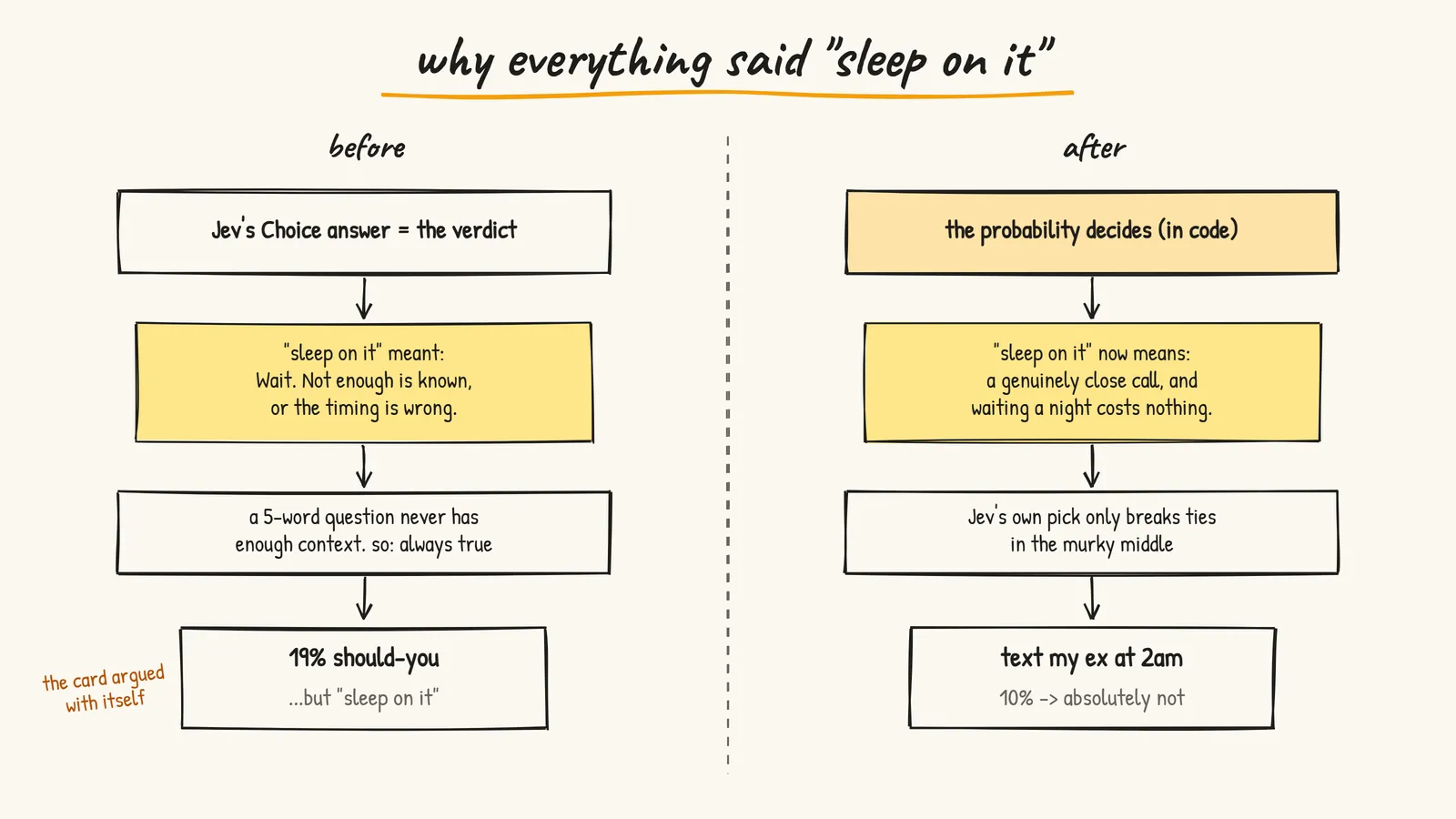
This is the most useful thing I learned from the whole project, so I'll say it plainly: with a model like Jev, the criteria are the product. An answer option that describes a situation that's always true becomes a catch-all.
The Fix: Policy Lives in Code
There were two ways out:
- Rewrite what "sleep on it" means so it's not a catch-all.
- Stop letting the Choice answer decide the verdict. Use the probability instead, and decide the verdict with rules in my own code.
I did both. TypeSafe's own guidance says the same thing: keep policy in code, keep the raw judgments reusable. The model gives you signals. Your code decides what to do with them.
"Sleep on it" got reworded to mean "a genuinely close call, and waiting a night costs nothing." And the verdict became a function:
// Policy lives in code: Jev's "should you" probability drives the verdict,
// and Jev's own choice only breaks ties in the murky middle.
const DO_IT_AT = 0.58;
const NO_AT = 0.2;

function decideVerdict(probability: number, jevChoice: Verdict): Verdict {
  if (probability >= DO_IT_AT) return "do it";
  if (probability <= NO_AT) return "absolutely not";
  // Middle band: Jev's own pick breaks the tie, but it can't contradict the
  // number by much; a hard no needs a low score, a go needs a decent one.
  if (jevChoice === "absolutely not") return probability <= 0.3 ? "absolutely not" : "sleep on it";
  if (jevChoice === "do it") return probability >= 0.45 ? "do it" : "sleep on it";
  return "sleep on it";
}
Those numbers weren't the first ones though. That took three more commits.
Tuning the Verdicts With Real Numbers
The first version of decideVerdict used 62% and 32%. At or above 62% was "do it", at or below 32% was "absolutely not", and the middle just used Jev's pick.
The card finally agreed with itself. "Text my ex at 2am" came back at 10% and said absolutely not. Good.
Then, a few hours later, I sent the agent this: "why i'm getting all the results like absolutely not bro :( tell me a example when it will say yes atleast".
Fair complaint. So instead of guessing, we ran a batch of real questions against production:
| decision | should you? | verdict | |---|---|---| | back up my laptop before the update | 94% | do it | | go for a 20 minute walk | 85% | do it | | start learning to cook | 84% | do it | | apologize to my friend for snapping at her | 83% | do it | | call my mom tonight | 64% | do it | | take the job offer with a 40% raise | 52% | sleep on it | | drop out of college to day trade crypto | 5% | absolutely not |
So Jev wasn't grumpy. It says yes all the time to healthy, reversible, specific stuff. The problem was the kind of question people naturally type into a "judge my decision" app: impulsive, irreversible, zero context. Text the ex. Quit the job. Buy the motorcycle. Jev scored those low, and my 32% cutoff stamped them as a hard no.
The 40% raise one is interesting too. 52%, because "job offer" alone doesn't tell you if the new place is worse. That's a context problem, not a model problem: a real sentence gives Jev a lot more to work with than five words.
Three Changes, Three Commits
Here's what changed, in the order I pushed it:
- Softer cutoffs. 62/32 became 58/22.
- A less doomy question. The original Noul asked "Given only
decision, should this person actually go through with it?" and the "no" side was described as "impulsive, harmful, poorly timed, or a bad bet". That wording primes a no. I changed it to "A friend asks youdecision. Would you tell them to go for it?" with balanced yes and no descriptions. The "no" cutoff moved to 20%. - A clamp on the tiebreaker. In the middle band, Jev's own pick used to win outright. That meant a 29% could still come out as "absolutely not", which felt harsher than the number. Now "absolutely not" in the middle only sticks at 30% or less, and "do it" only sticks at 45% or more. Everything else is "sleep on it".
The question rewording alone moved "confess to my crush" from 46% to 60%, and "buy a motorcycle" from 37% to 46%. Same model. Same input. Different question, different number. That's how much the wording matters.
After all three changes, this is where things landed:
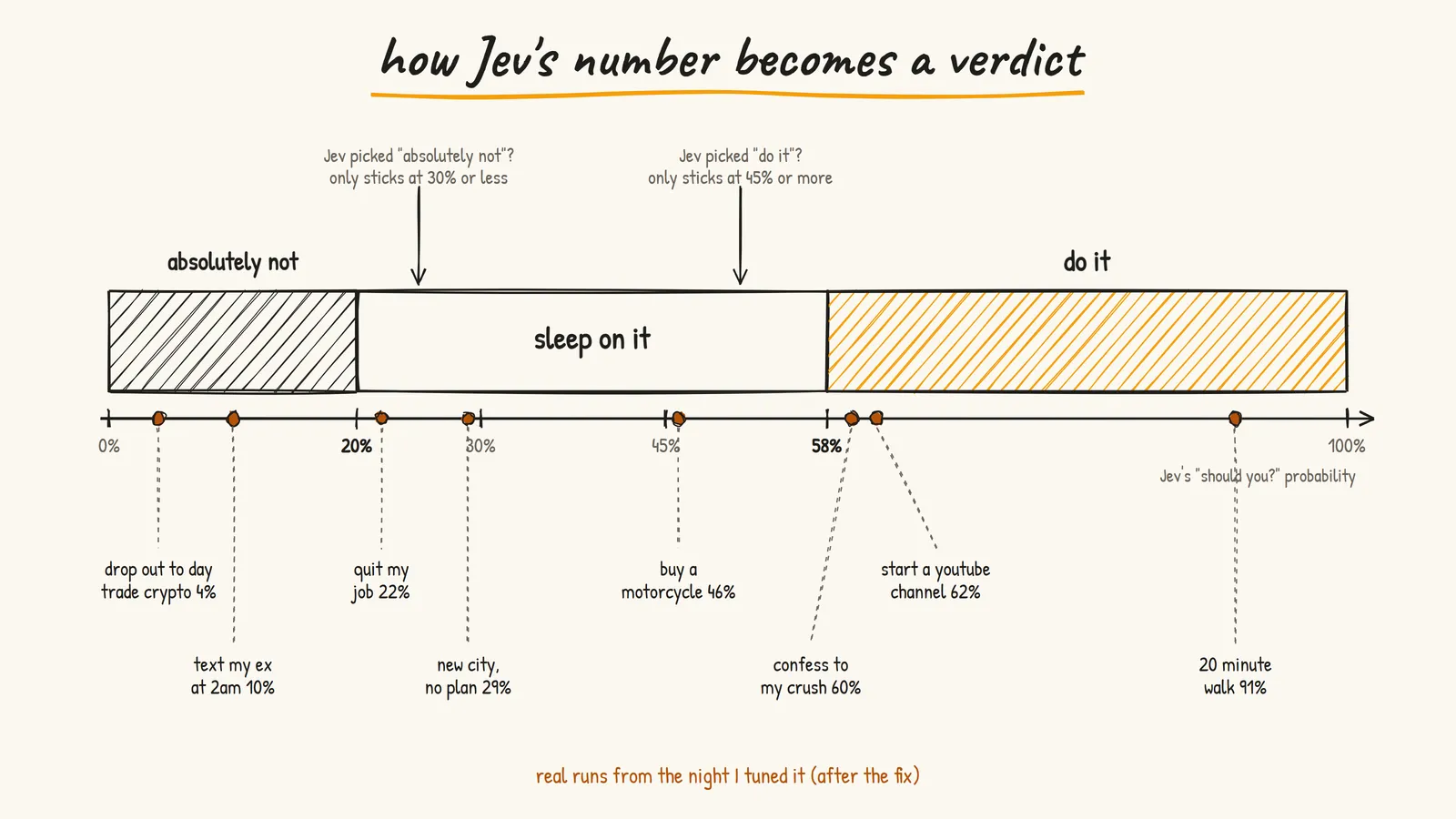
| decision | should you? | verdict | |---|---|---| | go for a 20 minute walk | 91% | do it | | start a youtube channel | 62% | do it | | confess to my crush | 60% | do it | | buy a motorcycle | 46% | sleep on it | | move to a new city with no plan | 29% | sleep on it | | quit my job | 22% | sleep on it | | text my ex at 2am | 10% | absolutely not | | drop out of college to day trade crypto | 4% | absolutely not |
"Absolutely not" is now saved for the genuinely dumb ones. Which is where you want the punchline anyway. Nobody screenshots "sleep on it". People screenshot "absolutely not" next to "should i text my ex at 2am".
Making It Talk Like a Friend
Three verdicts get boring fast. So I gave the agent a list of lines I actually say to friends: "you got this", "i mean ofc you can", "oh really", "i don't think so", "you're cooked mate", "it was a good run", "yo that's cringe", "don't even think about it", "incredible", and a few more.
The rule I cared about: the three real verdicts stay the source of truth for the logic and the URLs. The phrases are only flavour on top, and they're tiered by how strong Jev's number is:
function tierFor(result: JudgeResponse): readonly string[] {
  if (result.verdict === "do it") {
    return result.probability >= 0.85 ? PHRASES.emphaticYes : PHRASES.yes;
  }
  if (result.verdict === "absolutely not") {
    return result.probability <= 0.08 ? PHRASES.emphaticNo : PHRASES.no;
  }
  return PHRASES.maybe;
}
So a 91% walk might get "incredible." and a 4% crypto dropout gets "you're cooked buddy." or "don't even think about it."
The other rule: the same question must always show the same line. Otherwise a shared link would show a different card than the one the poster saw. So the phrase is picked with a tiny stable hash of the verdict and the question:
function hash(text: string) {
  let h = 5381;
  for (let i = 0; i < text.length; i += 1) h = ((h << 5) + h + text.charCodeAt(i)) | 0;
  return Math.abs(h);
}

export function verdictLabel(result: JudgeResponse) {
  const tier = tierFor(result);
  return tier[hash(`${result.verdict}|${result.question.toLowerCase()}`) % tier.length];
}
No randomness, no database, same answer everywhere. The page title and the share image use the same function.
The error messages got the same treatment. If you curl the endpoint you get "ask from the notebook." If you spam it: "too many questions at once. wait a beat." If Jev is unreachable: "couldn't reach jev. check the network and try again." Every error from the SDK is mapped to one of these one-liners. The real error message, status body, or stack never reaches the browser.
The Share Card Rabbit Hole
This took longer than the actual AI part. By a lot.
The whole point of a toy like this is that people post their card. So after the verdict I wanted "share on x", and I wanted the post to include the actual paper card, not just a link.
Attempt 1: Screenshot the Card in the Browser
The first version used modern-screenshot to turn the card's DOM node into a PNG at 2x scale. Fonts, torn edges, coffee stain, marker bar, all of it came out right. The agent checked by intercepting the download and looking at the actual image. It was a 1142 by 835 PNG and it matched the page.
export async function captureCard(frame: HTMLElement): Promise<Blob> {
  frame.classList.add("is-capturing");
  try {
    await new Promise((resolve) => requestAnimationFrame(() => resolve(null)));
    const blob = await domToBlob(frame, {
      scale: 2,
      type: "image/png",
      backgroundColor: getComputedStyle(frame).backgroundColor,
    });
    if (!blob) throw new Error("capture produced no image");
    return blob;
  } finally {
    frame.classList.remove("is-capturing");
  }
}
The is-capturing class turns off the ink-in animations and adds a paper background around the card, so the export doesn't catch a half-drawn frame or a transparent edge.
The problem: X's web share intent can't attach an image. It only takes text. So on desktop the flow was "we downloaded the image and copied it to your clipboard, now paste it into X yourself." That's one manual step too many. I wanted people to click once.
That button still exists as save the card, because some people just want the file.
Attempt 2: The Verdict Lives in the URL
X and LinkedIn can't take an image through a share link, but they will pull one from the link's preview card. So the fix was: give every verdict its own link, and make that link's preview image a server-drawn copy of the paper card.
The trick is that the verdict is encoded right in the query string:
export function encodeVerdict(result: JudgeResponse): URLSearchParams {
  return new URLSearchParams({
    q: result.question,
    p: String(Math.round(result.probability * 100)),
    c: result.confidence.toFixed(1),
    v: CODES[result.verdict],
  });
}
So a link looks like jevdecide.vercel.app/?q=should+i+quit+my+job&p=21&c=1.7&v=no. When someone opens it, the page decodes those params (every field is validated, or the whole thing is rejected) and shows that exact card right away. No Jev call. No database. Nothing to expire.
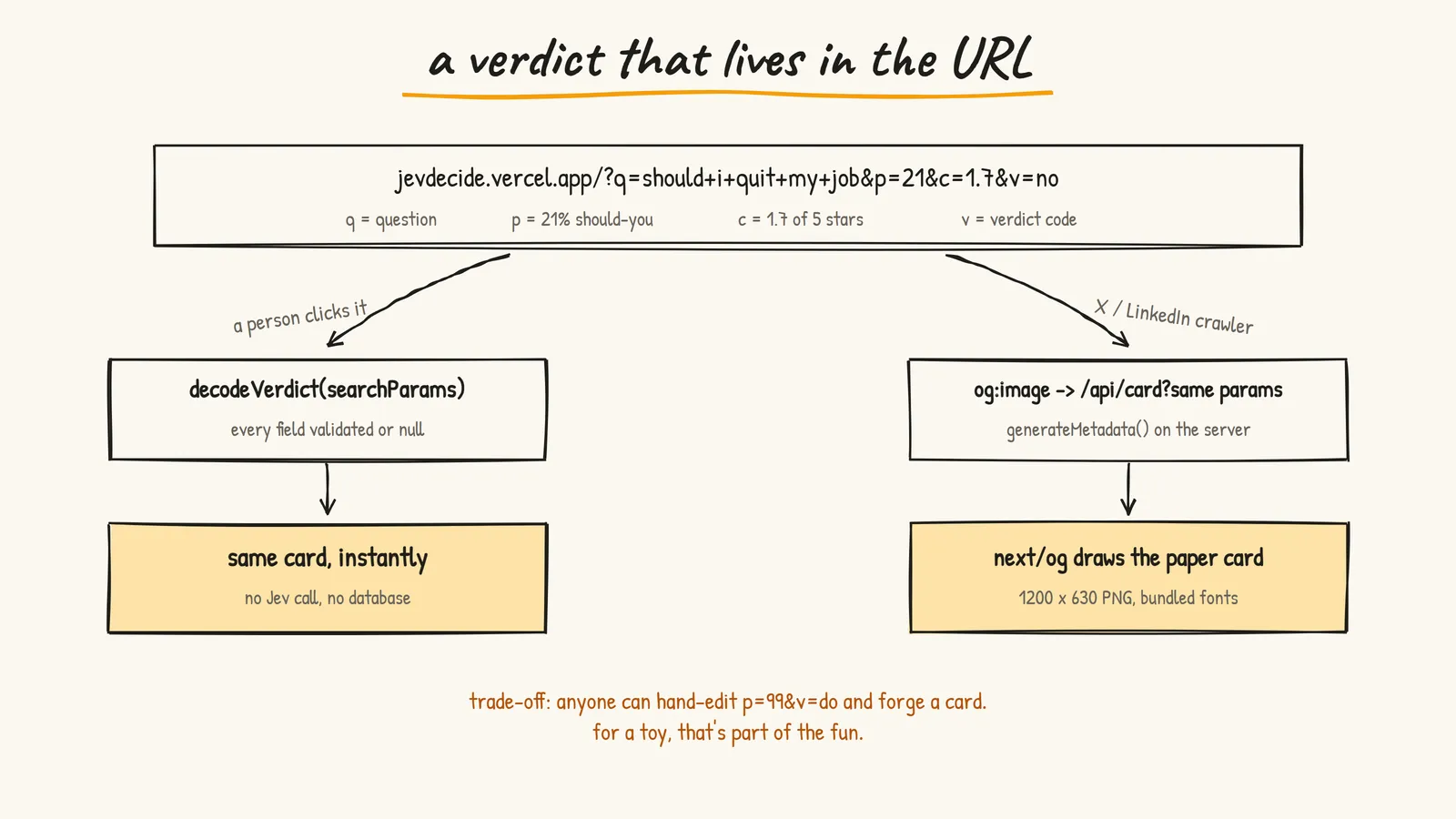
The page itself is a server component, and generateMetadata reads the same params to point og:image at the card route:
export async function generateMetadata({ searchParams }: PageProps<"/">): Promise<Metadata> {
  const result = decodeVerdict(await searchParams);
  const title = result ? shareTitle(result) : "let jev decide";
  const query = result ? `?${encodeVerdict(result)}` : "";
  const image = `${SITE_URL}/api/card${query}`;
  // ...openGraph + twitter tags using `image`
}
/api/card uses next/og to draw a 1200 by 630 version of the torn page: ruled lines, red margin, tilted card, coffee stain, marker bar, stars, and the verdict line in Caveat.
The annoying bit was fonts. next/og needs real font file bytes, not a Google Fonts CSS link. So I bundled Caveat Bold and Patrick Hand as .ttf files in the repo and told Next to include them in that route's serverless bundle:
const nextConfig: NextConfig = {
  outputFileTracingIncludes: {
    "/api/card": ["./assets/fonts/**"],
  },
};
Without that, the files exist locally and vanish in production. Classic.
The address bar also updates to the verdict link after every answer, using history.replaceState, so copying the URL gives you the exact card too.
Attempt 3: I Hated the Long URL
Then I actually saw a share post and my reaction was "this looks like so much cringe you know like a long url". A tweet with ?q=should+i+quit+my+job&p=21&c=1.7&v=no in it looks like spam.
So the share text now uses the clean https://jevdecide.vercel.app, and the post reads like:
asked jev: "should i quit my job"

let jev decide yours → https://jevdecide.vercel.app

made by @prasenx
The trade-off: the clean link can't carry the verdict, so its preview is a generic cover card ("let jev decide", double underline, tagline) instead of your specific verdict. The long links still work if anyone has one, and they still preview as the real card. They're just not in the share text anymore.
The proper fix is short IDs: store each verdict in Redis under a 5 character code and share /?j=x7k2q. Clean link and the real card. I haven't done it yet.
The Honest Downside of URL Verdicts
Since the verdict lives in the URL, anyone can hand-edit p=99&v=do and make a fake card saying Jev approved their terrible idea. For a toy, I'm fine with that. It's arguably part of the fun. For anything serious, you'd sign the params or store verdicts server-side.
Keeping Strangers From Burning My Quota
Before posting it on X, I asked: are we exposing any keys? The agent audited the live site instead of just saying "no": it searched the HTML and every JS chunk for the key pattern and the TypeSafe hostname. Zero hits. No NEXT_PUBLIC_ variables anywhere, and the one file that reads process.env is server-only, so the build fails if client code imports it.
But then I said the real thing: "i'm gonna post on x so people might try to steal you know".
Nobody can steal the key from the site. It never leaves the server. What they can do is hit /api/judge from a script in a loop and burn my TypeSafe quota. So two cheap guards went in before posting.
Guard 1: Same-Origin Check
Modern browsers send a Sec-Fetch-Site header on every request. If the request came from my own page, it says same-origin. A curl script doesn't send it at all.
export function isSameOrigin(request: Request) {
  const site = request.headers.get("sec-fetch-site");
  if (site) return site === "same-origin";

  // Older browsers: fall back to comparing Origin with the request host.
  const origin = request.headers.get("origin");
  if (!origin) return false;
  try {
    return new URL(origin).host === new URL(request.url).host;
  } catch {
    return false;
  }
}
A plain curl now gets 403 "ask from the notebook." and Jev is never called. It also stops people wiring my endpoint into their own site.
Guard 2: Per-IP Rate Limit
8 verdicts per minute per IP. After that, a 429 with a Retry-After header and "too many questions at once. wait a beat."
const WINDOW_MS = 60_000;
const MAX_PER_WINDOW = 8;

// Per-instance memory. Vercel reuses warm instances, so this catches the
// common "loop it from one machine" case; a Redis-backed limit can replace it.
const buckets = new Map<string, Bucket>();
Funny moment: right after deploying, the page itself showed the rate limit message. That was my own curl test from the same IP a minute earlier using up the window. The limit worked end to end, on me.
Both guards are cheap and honest about what they are. They stop the lazy attacks, which is most of what happens after a post goes out. They don't stop someone determined with lots of IPs, and the in-memory limiter is per server instance, so under heavy traffic the real cap is looser than 8. The actual hard ceiling would be a usage cap on the TypeSafe side, if their dashboard offers one. No amount of code replaces that.
The Small UI Stuff That Took Real Iteration
A bunch of little decisions came from actually using it:
- "Ask another" moved up. It started near the bottom. I wanted it right under the card, as a sketched button next to the share links, so it reads as the next action and not a footnote. Clicking it clears the line, scrolls back to the input, and puts the cursor in. The next question is one keystroke away.
- Shuffling examples was a bad idea. I asked for the example chips to reshuffle after every answer. The agent built it (a pool of 24 decisions, three drawn each time). I used it for a few minutes and said "don't shuffle stuff, revert it back bad idea". Now there's a fixed list of five, always in the same order. Stuff moving around every time you look at it just feels unstable.
- "Need inspiration? try an example question." One link that fills in the next example and asks Jev right away, in order. Predictable beats random here.
- A pen-drawn X logo. The footer handle got a small X mark drawn as two slightly uneven pen strokes, a hair off vertical. It inherits the ink colour, so on the chalkboard it turns into chalk automatically.
- A tiny contact line. "dm / sponsor / work → hi@prasen.dev" under the footer, as a
mailto:with the subject pre-filled so those emails land together.
And the notebook look itself is all CSS and inline SVG. No UI library. The margin doodles, the double underline on the title, the wobbly button outline, the marker bar that fills in, and the star outlines are all hand-written SVG paths. The chalkboard mode is a class on <html> that swaps the paper palette for a board, and the choice is saved in localStorage.
Should I Have Hosted It on Cloudflare?
My portfolio moved from Vercel to Cloudflare Workers last month, so of course I asked if Jev should move too. For this app, no. The dynamic share card is exactly the feature that's been flaky on Workers (there were open issues about the next/og WASM bundle blowing past the free tier's size limit), and with no fs on Workers the bundled fonts would need a rewrite. Hours of fiddling, zero visible gain.
The one real reason to move is commercial use, since Vercel's Hobby plan is non-commercial. If this ever makes money, it moves. Until then it stays at jevdecide.vercel.app.
Things I Learned About Building With Jev
The short list I wish I'd had before starting:
- The criteria are the prompt. The question is short. The answer descriptions are what the model actually compares.
- Watch for catch-all answers. An option that's true for most inputs will win most of the time, and the model is right to pick it.
- Neutral wording, neutral numbers. Loaded words on the "no" side dragged every probability down.
- Put policy in code. Moving a threshold is a one-line change. Fixing behaviour through prompt wording is not.
- Batch independent questions. One request, several questions, same state.
- Test with a table, not with vibes. Things only got better once we ran 7 to 8 real questions at a time against production.
- Typed output guarantees the shape, not the truth. The SDK makes sure
verdict.choiceis one of my three strings. Whether the answer is wise is still on me.
What's Not Good Yet
I like being honest about this part, so here's the list.
The visitor counter isn't live. The code is deployed. It counts one visit per browser per day, and it works with either Upstash REST credentials or a plain REDIS_URL. But production has no Redis credentials yet, so /api/visit returns null and the counter stays hidden. It's been "waiting on creds" since the night I built it.
The rate limiter is per instance. It's an in-memory Map. Fine for a toy, not exact. It should move to Redis along with the counter.
Verdict links are forgeable. Covered above. Fun for now, wrong for anything that matters.
The clean share link loses the real card. Posts preview as a generic cover instead of your actual verdict. Short IDs would fix it.
The page never explains what Jev is. Every card says "judged by jev", and nothing on the page tells you Jev is a TypeSafe model. A one-line credit was suggested that night and I never said yes. It should be there. It's the only credit that actually changes someone's understanding of the page.
The thresholds were tuned on about a dozen questions, in one night. 58% and 20% feel right on the examples I tried. That's not the same as being right. TypeSafe's own docs say to validate thresholds on your own data and consequences. I haven't collected any data to validate against.
The stars barely move. Most short questions land around 2 stars, because short questions really are a weak read. Accurate, but a bit flat. A hint under the input like "the more you tell jev, the better the call" would probably help more than any code change.
The example chips skew negative. Text my ex at 2am, quit my job, will I be a billionaire. First-time visitors see mostly "no" answers and might think that's all it does. At least one obviously healthy example ("should i go for a walk right now") would show the full range.
I couldn't test Jev locally. My machine couldn't reach TypeSafe's API. The request just timed out. Production on Vercel could. So every real Jev test during the build happened on the live site. It worked, but it's not a workflow I'd recommend.
I pasted my API key into the agent chat. Don't do this. It's not in the code, not in git, not in the client bundle. But it's in a chat log, which means I should rotate it. Put secrets straight into .env.local and your host's env settings. The agent doesn't need to see them.
No tests. decideVerdict, encodeVerdict, decodeVerdict, and verdictLabel are pure functions and would take ten minutes to test. They should have tests. They don't.
What I'd Do Differently
If I started over tomorrow:
- Write the questions and criteria first, on paper, before any UI. Then run 20 real inputs through them before designing a single pixel. Most of my fixing was question design, not code.
- Decide the verdict in code from day one. Never let a single Choice answer be the whole product.
- Set up Redis on the first day. Counter, exact rate limiting, and short share IDs all need it. Leaving it for "later" meant three features stayed half-done.
- Keep the share URL short from the start. Short IDs would have avoided the whole "long URL vs real preview card" trade-off.
- Look for a usage cap on the provider side before posting. Code guards are nice. A hard spending ceiling is the real protection.
Why This Was Worth One Evening
The funny part is that the Jev call itself is maybe 20 lines. Everything else is normal web engineering: validation, rate limits, share cards, fonts in serverless bundles, OG tags, a hash function, CSS that looks like ink.
That's kind of the point of models like Jev. It isn't a chatbot you build a product around. It's a small piece of judgment you drop into ordinary code, exactly where if/else can't understand what a human meant. Everything around it is still your job.
And honestly, it's fun. Go ask it something. Just maybe not about your ex.
Resources
- Let Jev Decide - The app from this post
- TypeSafe Docs - Documentation index for Jev and the System One API
- System One concepts - What System One models are and how to think about them
- TypeSafe primitives - Choice, Noul and Score explained
- TypeSafe JavaScript SDK - The SDK I used
- Next.js Open Graph images - How
next/ogand share images work - My harness post - Why building with an agent that can test its own work is so fast
- Prasenjit