How to Use Cursor for Free (2026 Update)
Short version: the trick this post used to explain does not work anymore, and I'm not going to pretend it does. What still works is boring but real: Cursor's free Hobby plan, a few student and academic routes, and using your free usage like it's limited, because it is.
This post covers what the old method was and why it died, what you actually get for free today, and how I'd set things up if I had zero budget.
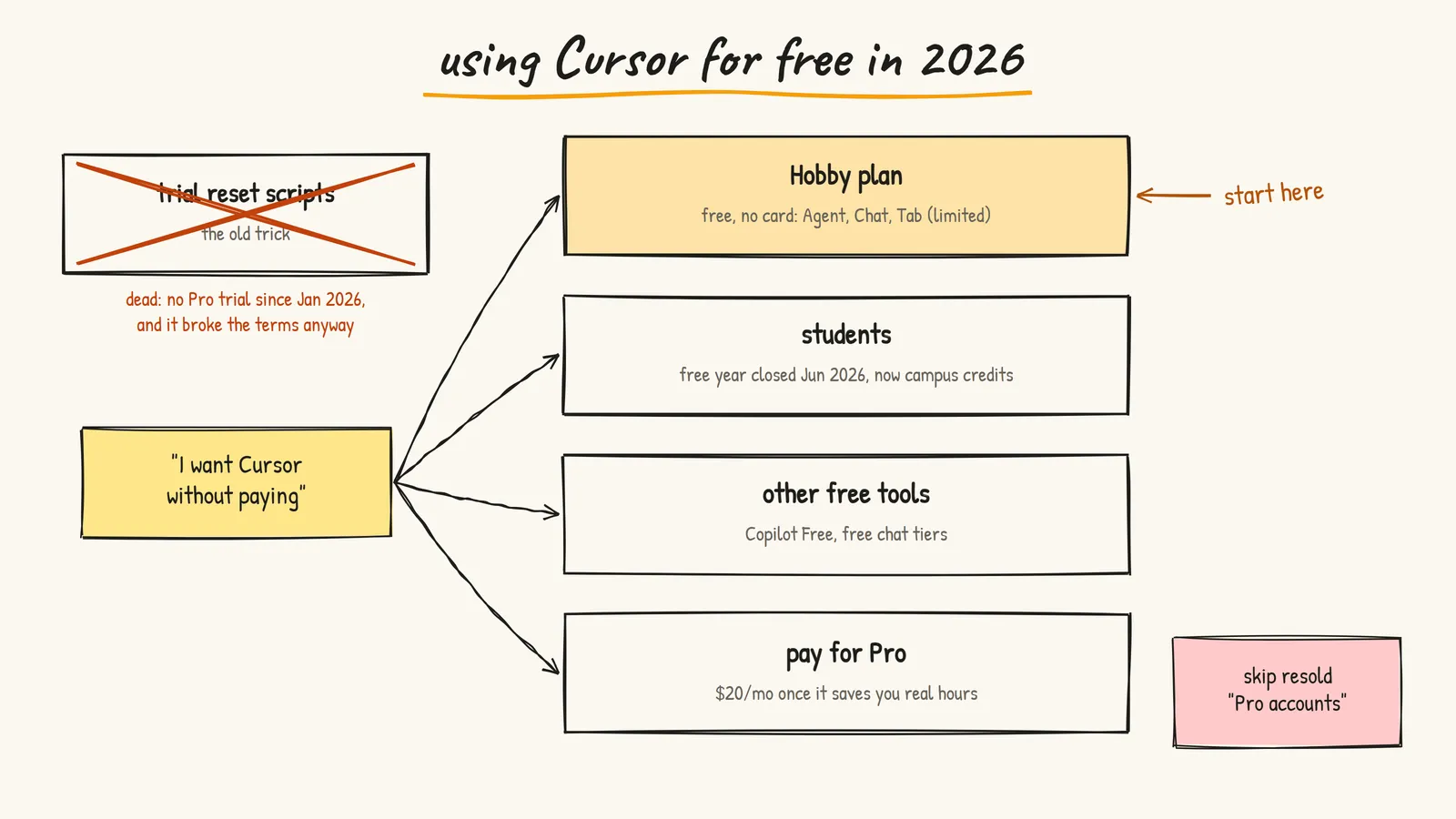
Heads Up: The Old Method Is Dead
When I first wrote this in April 2025, a bunch of people were using open source scripts that reset Cursor's local data and machine ID. Cursor saw a "new" device, and you got a fresh Pro trial. I wrote a step by step guide for it.
That stopped working, and honestly the whole thing backfired on everyone:
- The trial itself is gone. Cursor removed the free Pro trial in January 2026. Their staff said so directly on the forum and on Reddit: no more two week Pro trial, use the Hobby plan to try Cursor.
- There's nothing left to reset. The scripts only ever worked because a trial existed. No trial, no loophole.
- It was against the terms anyway. Those scripts faked your hardware identity to get around Cursor's limits. That's the kind of thing that gets accounts banned, and running a random admin PowerShell script from the internet on your machine is its own risk.
So I've removed the old step by step guide and the links to those repos. If you find a video still promising "Cursor Pro unlimited free", it's either outdated or it wants you to run something you shouldn't.
What You Actually Get for Free
Cursor still has a real free plan. It's called Hobby, and here's what the pricing page and help docs say as of September 2026:
- Price: free, no credit card required
- What's included: Agent, Chat and Tab completions, with limited usage
- Models: the Auto model on the free plan, not your pick of frontier models
- Limits: Cursor doesn't publish exact numbers for Hobby anymore. You'll see your usage in the dashboard at cursor.com
That's enough to learn the editor, try the agent on small tasks, and decide whether it's worth paying for. It's not enough to run agents all day on a big project. That's the honest trade.
For reference, the paid individual plans are Pro at $20/month, Pro+ at $60/month and Ultra at $200/month. Each includes a set amount of model usage, and you can keep going on usage-based billing after that.
Getting set up
- Download Cursor from cursor.com (Windows, macOS, Linux)
- Sign in with GitHub, Google or email. You land on Hobby by default
- If you're coming from VS Code, import your extensions and settings when it asks
- Open a project and try Agent on something small, like "add input validation to this form"
That's it. No scripts, no admin terminal.
Student and Academic Options
This is where old blog posts will mislead you the most, so here's the current state.
Cursor used to give verified students a free year of Pro. New sign-ups for that closed on June 25, 2026. Cursor's student discount page says the program had become a target for fraud. If you already redeemed it, you keep it until your plan expires, and then it renews at $20/month unless you cancel. Set a reminder for that date.
What replaced it:
- Undergrads: credits and discounts handed out at on-campus and online events, starting fall 2026. Cursor has a campus newsletter for early access.
- Master's students, PhD candidates, researchers and educators: there's a form to request credits for your work.
Neither is a guaranteed free year for everyone. But if you're in college, watch for Cursor events at your campus or hackathons. That's the legit version of "free Pro" now.
Stretching the Free Plan
If you're on Hobby, your usage is the scarce thing. Spend it where it matters:
- Plan in a regular chat first. Think through the approach somewhere free, then hand Cursor a clear, small task. Vague prompts burn requests on back and forth.
- Keep tasks small. "Add a loading state to this button" is one request. "Build me the dashboard" is ten requests and a mess.
- Give it the right files. Point the agent at the files that matter instead of letting it wander your whole repo.
- Write a rules file. A short project rules file with your stack and conventions means fewer "no, we use Tailwind" corrections.
- Do the easy stuff yourself. Renaming a variable or fixing a typo doesn't need AI. Save it for the parts that are actually slow for you.
A rules file doesn't need to be fancy. Something like this in .cursor/rules/project.mdc already helps:
---
description: Project basics
alwaysApply: true
---

- Next.js App Router, TypeScript, Tailwind
- Use existing components in src/components before making new ones
- No new dependencies without asking
- Keep changes small and explain what you changed
Other Free Options Worth Knowing
Cursor isn't the only way to get AI in your editor without paying:
- GitHub Copilot Free: up to 2,000 completions a month plus limited chat and agent usage, no card needed. Verified students can get the free Copilot Student plan. Check GitHub's plans page, because the details have been changing a lot this year.
- Free chat tiers: Claude, ChatGPT and Gemini all have free chat plans. Copy-pasting code into a chat is clunkier than an agent, but it's fine for learning and debugging.
One thing I'd avoid: cheap "Cursor Pro accounts" sold on random sites or Telegram. Cursor's pricing page says plainly that subscriptions are only sold on cursor.com and that resold accounts can be suspended at any time. You'd be paying for something that can vanish tomorrow.
What I'd Actually Do
If I had zero budget today:
- Start on Cursor Hobby and learn the editor properly
- Write a small rules file for my main project
- Use free chat tools for planning and explaining, Cursor for the actual edits
- If I'm a student, sign up for Cursor's campus newsletter and GitHub's student plan
- Once Cursor is saving me hours every week, pay the $20 for Pro. At that point it's cheap
The old trick felt like a win at the time, but it was always borrowed time. The free plan is smaller, but nobody can take it away from you.
Resources
- Cursor Pricing - Current plans and what's included
- Cursor Plans Help - What the Hobby plan covers
- Cursor Student Discount - What happened to the student year and what replaced it
- Cursor Rules Docs - How to write project rules
- GitHub Copilot Plans - Free and student Copilot options
- Prasenjit