Claude Skills Are Basically Custom Modes for AI. And They're Sick
Imagine teaching Claude your exact workflow once, and then it just... remembers. Every time. Without you pasting the same instructions again.
That's Skills. In this post I'll explain what they are in plain words, how Claude decides when to use one, how to write your first Skill (with a real example you can copy), and where Skills work now, because in 2026 it's not just Claude anymore.
What Are Skills?
In simple terms: a Skill is a folder with a SKILL.md file inside. That file has instructions, and optionally the folder has scripts, templates or reference docs. Claude loads it when a task needs it.
Instead of pasting your team's coding guidelines into every conversation, you make a Skill for it. Next time you ask Claude to review code, it pulls in those guidelines by itself.
Instead of explaining your writing style every time, you make a Skill. Claude just knows.
It's like presets on a camera. You set it up once, then just click.
How They Actually Work
When you ask Claude to do something, it looks at the Skills you have turned on and goes "oh, this task matches that Skill" and loads the relevant instructions.
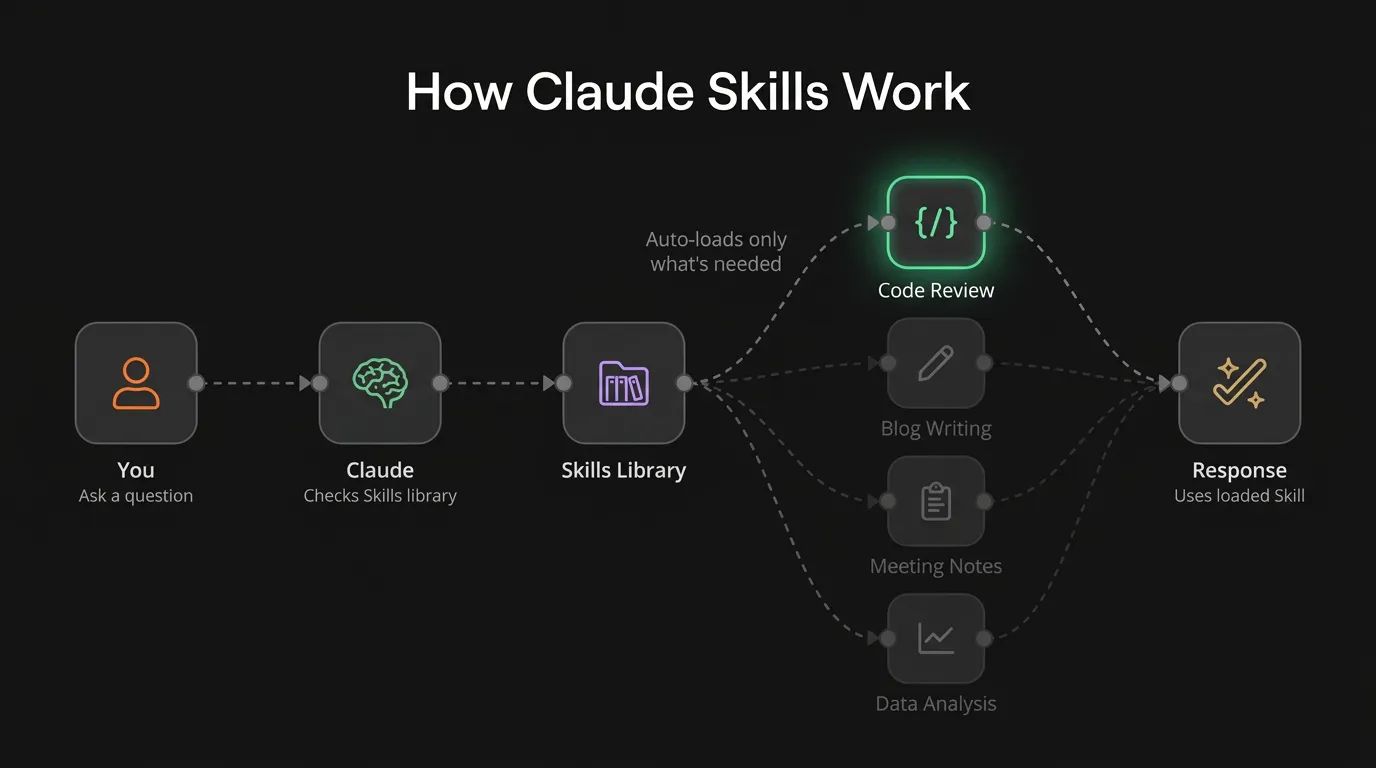
The cool part: it doesn't load ALL your Skills at once. It picks the relevant ones. So you can have 20 Skills and it won't slow things down or confuse the model.
This is called "progressive disclosure", which is a fancy way of saying "it only loads what it needs." The spec spells out the three levels:
- Name and description of every Skill are always loaded. That's tiny, roughly 100 tokens per Skill.
- The full
SKILL.mdgets loaded only when a task matches. - Extra files (scripts, references, templates) get read only if the instructions point to them and the task needs them.
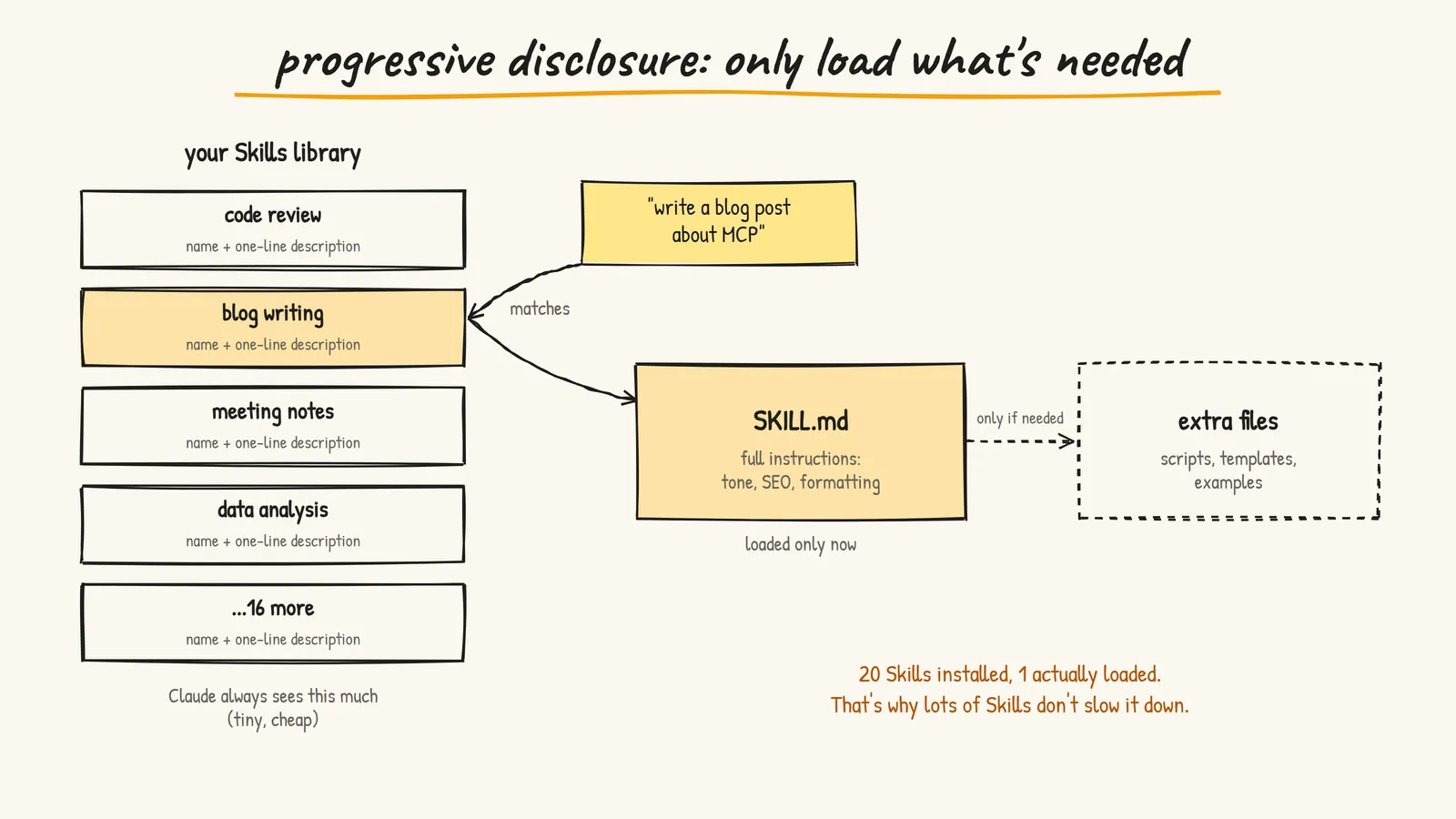
This is also why the description matters more than anything else in the file. It's the only part Claude sees before deciding. A vague description means your Skill never gets picked.
Types of Skills
Anthropic's Built-in Skills
These come out of the box: better Excel, Word, PowerPoint and PDF creation. You don't set anything up. Ask for a slide deck and Claude uses the PowerPoint Skill on its own.
Custom Skills (This Is Where It Gets Good)
You write your own. And you write them in Markdown. Not Python. Not JavaScript. Plain instructions.
Some ideas:
- Code Review Skill: your team's style guide, common anti-patterns to catch, PR template format
- Blog Writing Skill: your tone of voice, SEO rules, formatting preferences
- Meeting Notes Skill: your template, action item format, who-does-what structure
- Data Analysis Skill: your org's metrics, chart formats, reporting style
Partner Skills
Companies like Notion, Figma and Atlassian have built Skills that pair with their MCP connectors. So you can manage Jira tickets through Claude with the right Skill + MCP combo.
Write Your First Skill
Here's the whole anatomy. A folder, a SKILL.md, and optional extras:
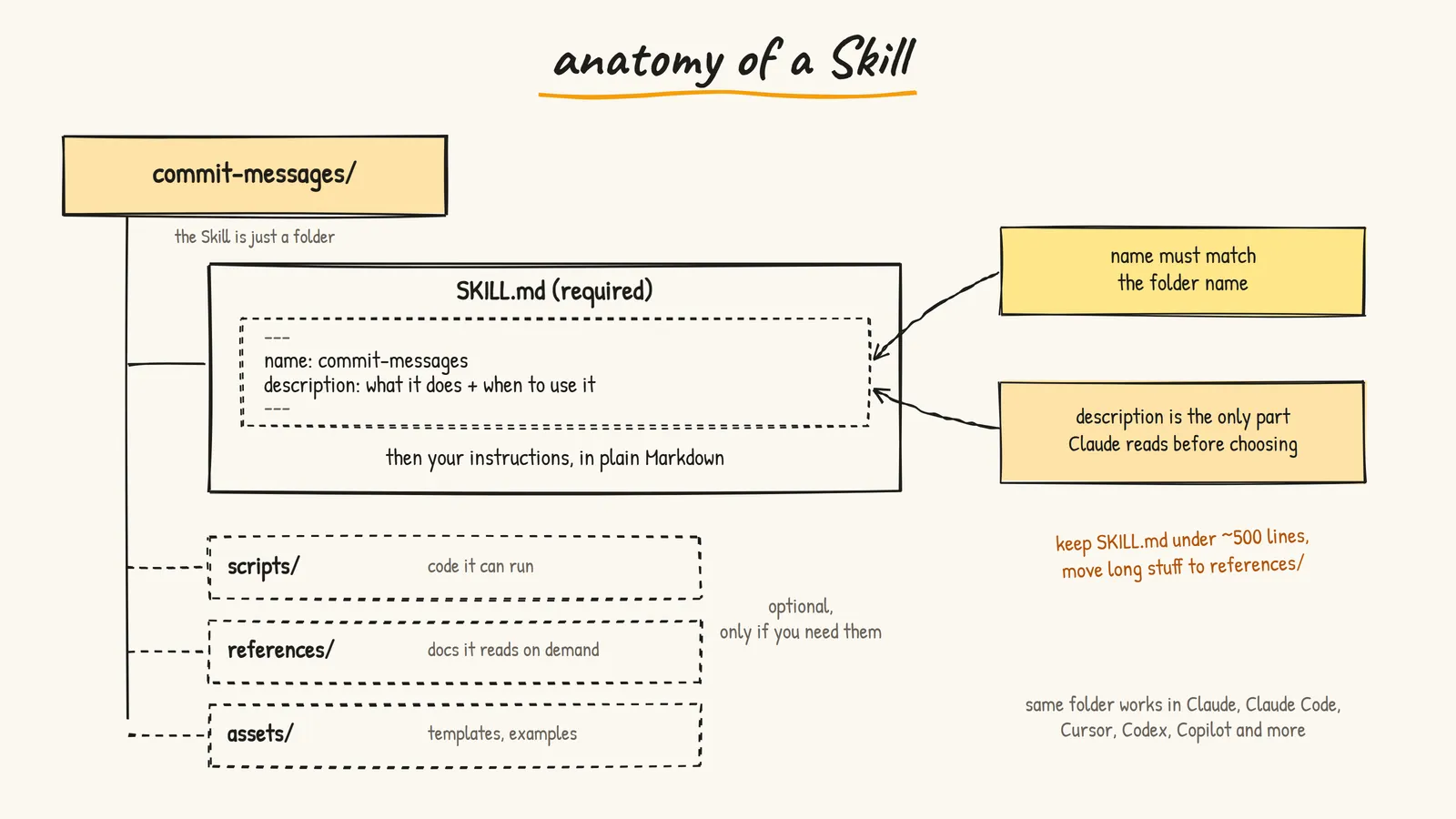
The only required file is SKILL.md. It starts with a small YAML header (frontmatter) and then your instructions. Here's a real one for writing commit messages:
---
name: commit-messages
description: Writes git commit messages in our team format. Use when the user asks for a commit message, wants to commit changes, or asks to summarize a diff for a commit.
---

# Commit messages

1. Read the staged diff first. Don't guess from file names.
2. First line: imperative mood, max 60 characters, no period.
   Good: "Add retry to payment webhook"
   Bad: "Added some fixes."
3. Leave a blank line, then 1 to 3 bullets explaining why, not what.
4. If the diff mixes unrelated changes, say so and suggest splitting it.
5. Never mention AI or tools in the message.
A few rules from the spec that trip people up:
nameis lowercase letters, numbers and hyphens only, max 64 characters, and must match the folder name. So this lives in a folder calledcommit-messages.descriptionsays what it does and when to use it, max 1024 characters. Put the words people will actually type ("commit", "diff") in there.- Keep
SKILL.mdunder about 500 lines. If it grows, move the details into areferences/file and link to it.
Adding it in Claude (the app)
- Go to Settings > Capabilities and make sure Code execution and file creation is on. Skills need it.
- Open Customize > Skills.
- Zip the folder (the zip should contain the
commit-messagesfolder withSKILL.mdinside). - Click +, then Create skill, then Upload a skill, and pick the zip.
- Toggle it on. Then test it with a few different prompts, like "write a commit for this diff".
Skills are available on Free, Pro, Max, Team and Enterprise plans now. When I first wrote this post it was a paid-plan thing, so that's a nice change.
Adding it in Claude Code
Even simpler. No zip, just a folder:
mkdir -p ~/.claude/skills/commit-messages
# then save your SKILL.md inside that folder
~/.claude/skills/ is for you across every project. Put it in .claude/skills/ inside a repo instead and commit it, so your whole team gets the same Skill. You can also call a Skill directly by typing /commit-messages.
It's an Open Standard (and It Actually Spread)
Skills aren't locked to Claude. Anthropic published the format as an open standard at agentskills.io.
When I first wrote this, that was a nice promise. Now it's real. The agentskills.io site lists support in Cursor, OpenAI's Codex, GitHub Copilot, VS Code, Gemini CLI, and a long list of other agents. The same folder with the same SKILL.md works across them.
That matters because you're not writing prompts for one vendor anymore. You're writing a small, portable instruction pack that follows you between tools. I respect Anthropic for not locking this down.
Skills vs Other Claude Features
Quick comparison because I was confused at first:
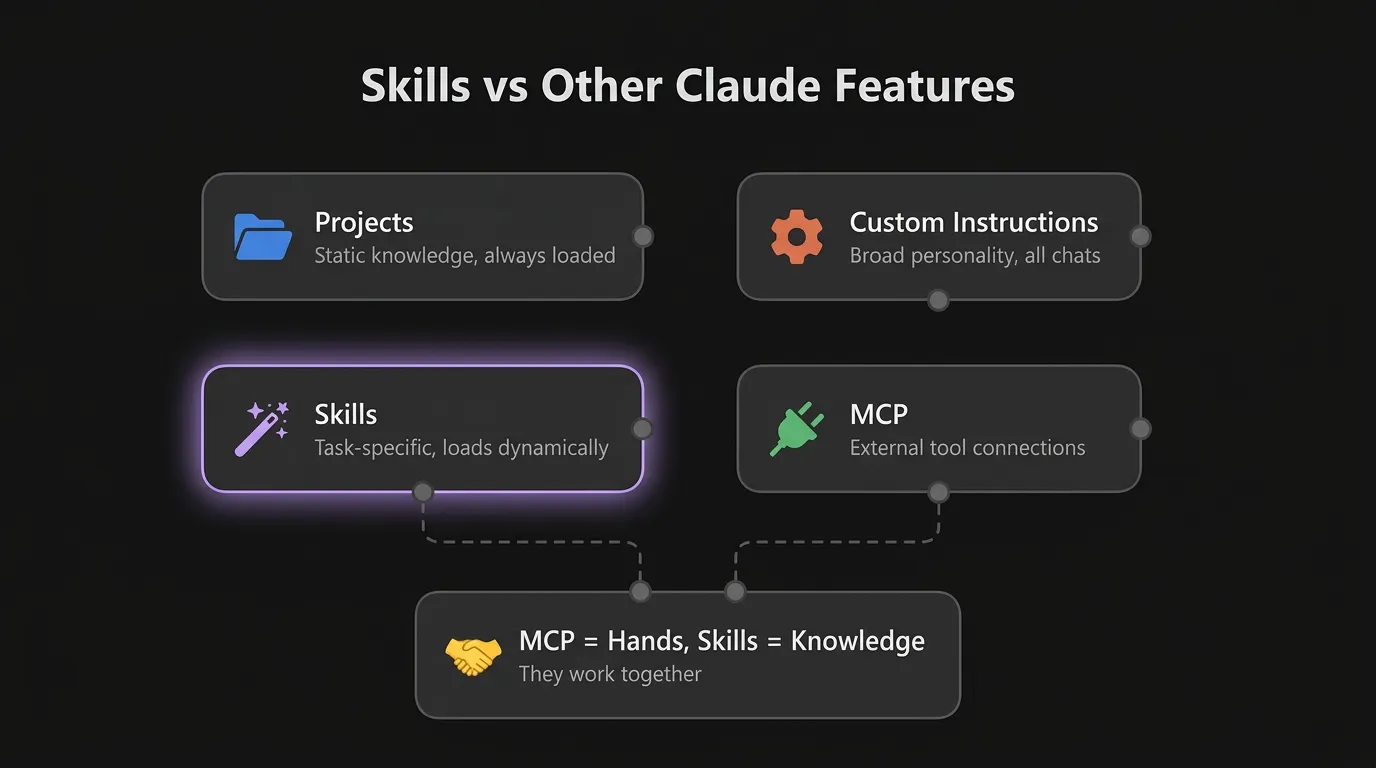
- Projects: static knowledge (files, docs) that's always there for one project
- Custom instructions: broad personality and preferences for every chat
- Skills: task-specific know-how, loaded only when relevant
- MCP: connections to external tools and data
They all work together. MCP gives Claude hands. Skills teach it what to do with those hands. If you want the hands part explained, I wrote a whole post on MCP.
A Quick Warning About Other People's Skills
A Skill can include scripts, and it can tell Claude to install packages or call websites. Anthropic's own help docs call out prompt injection and data exfiltration as the main risks.
So treat a Skill from a stranger like a random script from the internet:
- Read
SKILL.mdand every script before you turn it on - Be suspicious of instructions that send data to URLs you don't recognize
- Prefer Skills from Anthropic, the tool you're using, or people you trust
Should You Make Your Own?
If you keep pasting the same instructions into Claude, yes, make a Skill.
If your team has a workflow everyone should follow, yes, make a Skill and share it (or commit it to the repo for Claude Code).
If you use Claude casually for random questions, you probably don't need one yet.
What I'd Actually Do
- Look at your last week of chats and find the instructions you repeated most
- Turn the top one into a Skill with a very specific description
- Test it with 3 or 4 differently worded prompts and check it actually triggers
- If it doesn't trigger, fix the description first, not the instructions
- Only then make the second one
Start with one small, boring Skill that saves you a paste every day. That's how they earn their keep.
Resources
- Use Skills in Claude - Official guide to enabling and uploading Skills
- How to Create Custom Skills - Anthropic's step by step guide
- Agent Skills Specification - The open format, including the frontmatter rules
- Claude Code Skills Docs - Skills in the terminal, personal vs project folders
- My MCP post - The "hands" half of the story
- Prasenjit