How I Actually Use AI As a Developer (No BS Guide)
Every other day there's a new tweet saying "AI will replace developers" or "if you're not using AI you're already dead" and honestly? Both takes are trash.
AI is a tool. A really good tool. But it's not magic, and it doesn't replace knowing what you're doing.
This post is how I actually use it: my setup, the tasks where it saves me real time, a before and after prompt you can steal, where it falls apart, and what the one serious study on this found (spoiler: it should make all of us a bit humble).
My Daily Setup
I use Cursor as my code editor. It's VS Code with AI built in, and most of my work now goes through its agent: I describe a task, it reads the relevant files, makes the change, runs things, and I review. I also use Claude directly for longer conversations, planning and thinking out loud.
That's it. I don't have 17 AI subscriptions. Two tools, used well.
What changed since I first wrote this is less about the tools and more about the setup around them. A rules file with my project conventions, a browser the agent can check its work in, tests it can run. I wrote a whole post on why that matters: your AI isn't dumb, your harness is.
What AI Is Great At (and Bad At)
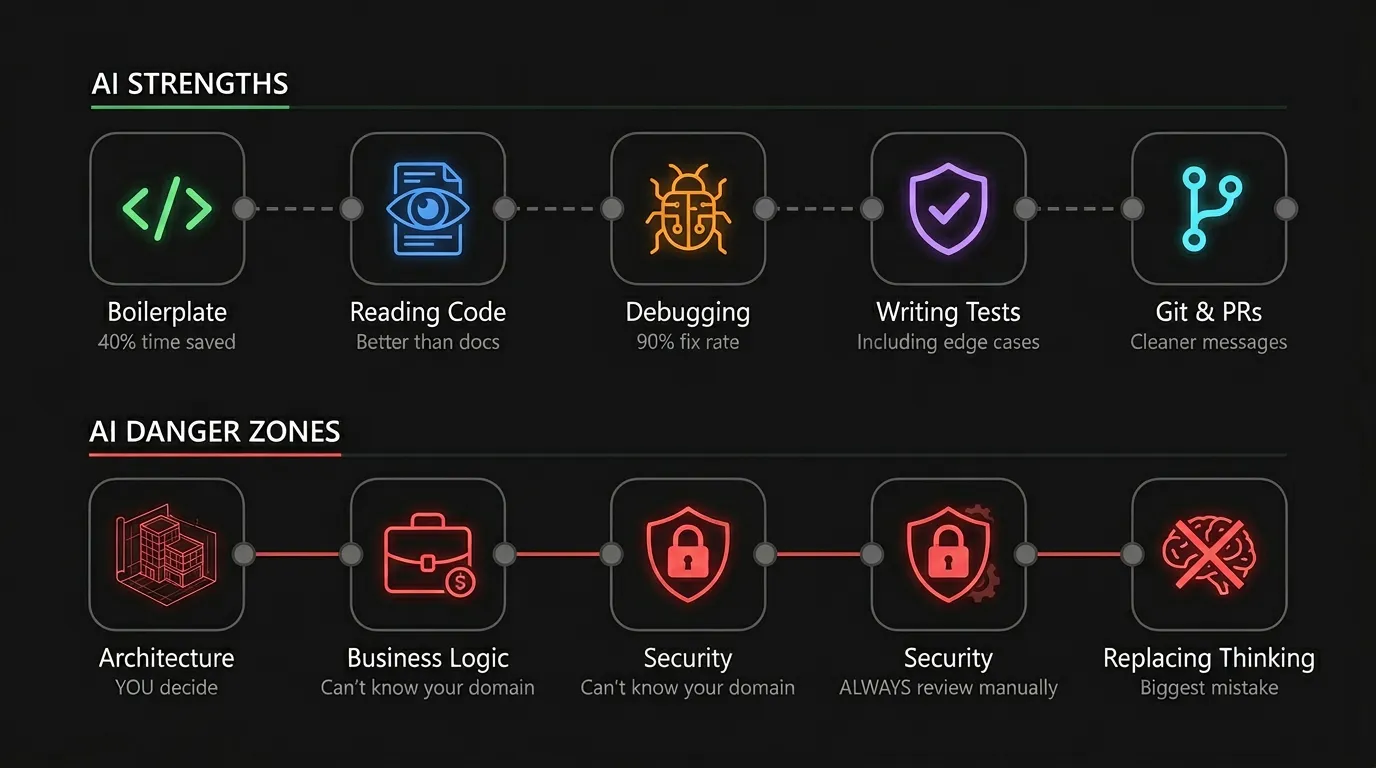
1. Boilerplate Code
The most obvious one. Setting up a new component, writing types, creating API routes. Stuff you've done a hundred times.
I don't write boilerplate anymore. I describe what I need, the AI generates it, I review it, tweak it, and move on. On boilerplate-heavy days it feels like it saves me something like 40% of the day.
2. Understanding Unfamiliar Code
Got a codebase you've never seen? Instead of spending three hours clicking through files, I ask "what does this module do, what calls it, and why is it built this way?"
With an agent that can read the whole repo, this got way better. It follows the imports for you. The answer is usually better than the docs, and it's a great first pass before you read the code yourself.
3. Debugging
"This function returns undefined when the input is an empty array, here's the code" and most of the time the fix is right there.
The key is context. Don't paste just an error message. Paste the code, the error, and what you expected to happen. AI needs the same context a human would need. More on that in the next section, because this is where most people go wrong.
4. Writing Tests
Nobody likes writing tests. I said it. AI makes it bearable. I describe what the function should do, and it writes the cases, including edge cases I wouldn't always think of.
One warning: read the assertions. AI loves writing tests that pass by testing nothing, like checking that a function "returns something" instead of returning the right thing.
5. Git Commit Messages and PRs
Small thing, but I let AI draft my commit messages and PR descriptions. They come out cleaner than what I'd write at 2am. I still read them, because a wrong PR description is worse than a short one.
The Prompt That Actually Works
Most "AI is useless" complaints I see come from prompts like this:
fix this
TypeError: Cannot read properties of undefined (reading 'map')
The AI has no idea what "this" is. It will guess, and the guess will be generic.
Here's the same request with context:
In src/components/OrderList.tsx, the page crashes with:
TypeError: Cannot read properties of undefined (reading 'map')

It happens on first load, before the fetch in useOrders() finishes.
orders should be an empty array until data arrives, then the list.
Don't change the API or the hook's return type.
Fix it with the smallest change and tell me why it crashed.
Four things changed:
- Where: the exact file
- When: first load, before the fetch finishes. That's basically the diagnosis
- Expected: what should happen instead
- Limits: what it's not allowed to touch, and "smallest change"
That last part matters a lot. Without limits, AI tends to "fix" things by rewriting half the component. With limits, you usually get a one-line default value and an explanation you can check.
What AI Is Bad At
Architecture Decisions
"Should I use a monorepo?" "Postgres or MongoDB?" AI will give you an answer, but it doesn't know YOUR situation: team size, scale, budget, what's already running.
I use AI to explore options and understand trade-offs. But I make the call.
Complex Business Logic
If the logic depends on deep knowledge of your business, AI struggles. It can implement what you describe, but it can't decide what the rules should be.
Security
Never blindly trust AI-generated code for authentication, authorization, payments, or data handling. Review security-critical code by hand. Always. AI is very good at producing code that looks right and quietly skips a permission check.
Replacing Thinking
The worst thing you can do is stop thinking and accept whatever comes back. If you don't understand the code, you can't debug it when it breaks. And it will break.
My Rules
-
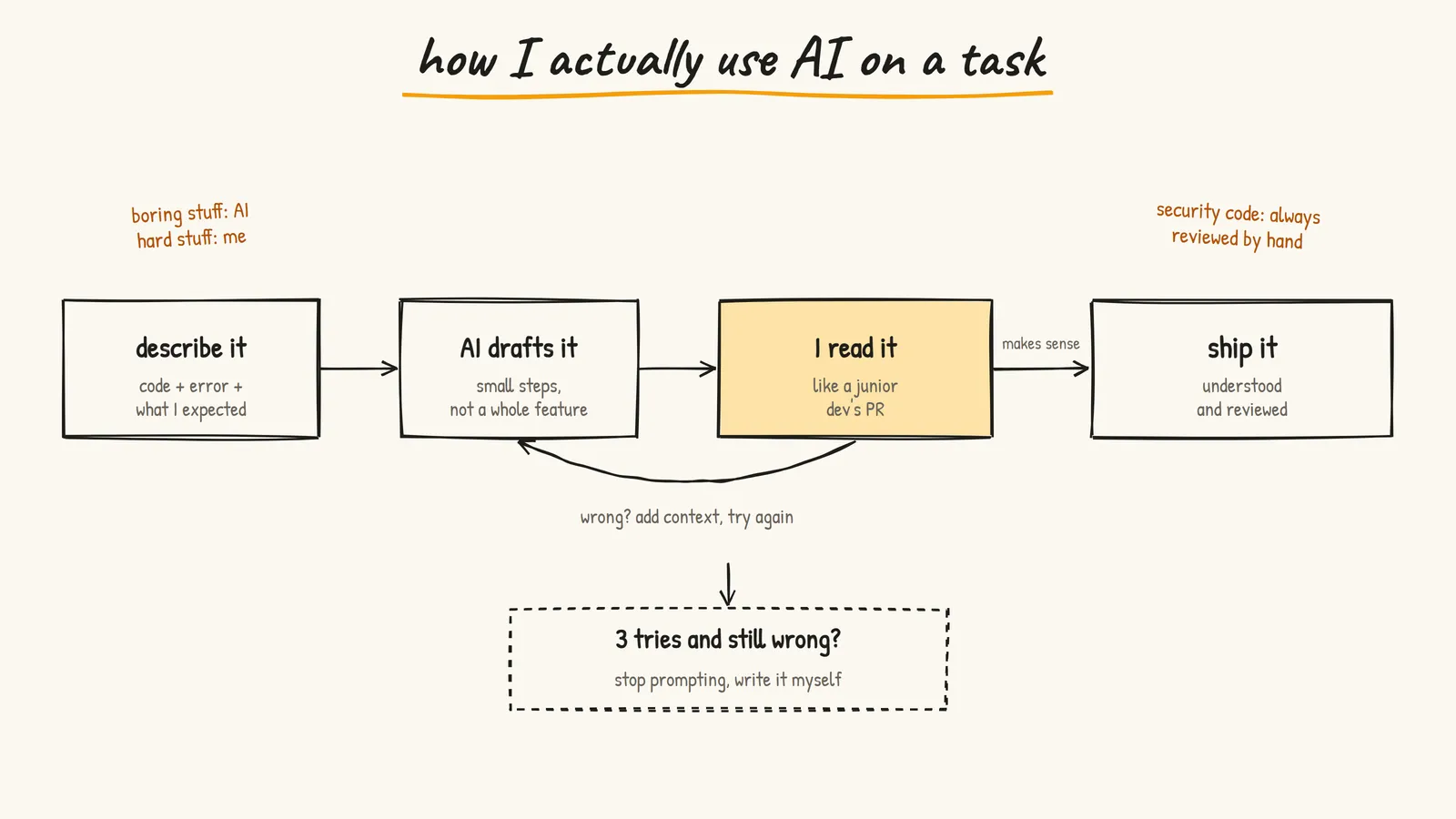
Always read what AI writes. Read it like a junior dev's PR.
-
Small prompts beat big prompts. Don't build a whole feature in one shot. Break it into steps you can review.
-
Give context, get quality. "Make a button" vs "Make a primary CTA button with loading, disabled and size variants using our existing design tokens."
-
Use it for the boring stuff. Save your brain for the hard problems.
-
Don't fight the tool. If it's still wrong after 3 attempts, write it yourself. Know when to stop prompting and start coding.
Put together, those rules make a loop:
The Reality (and What the Research Says)
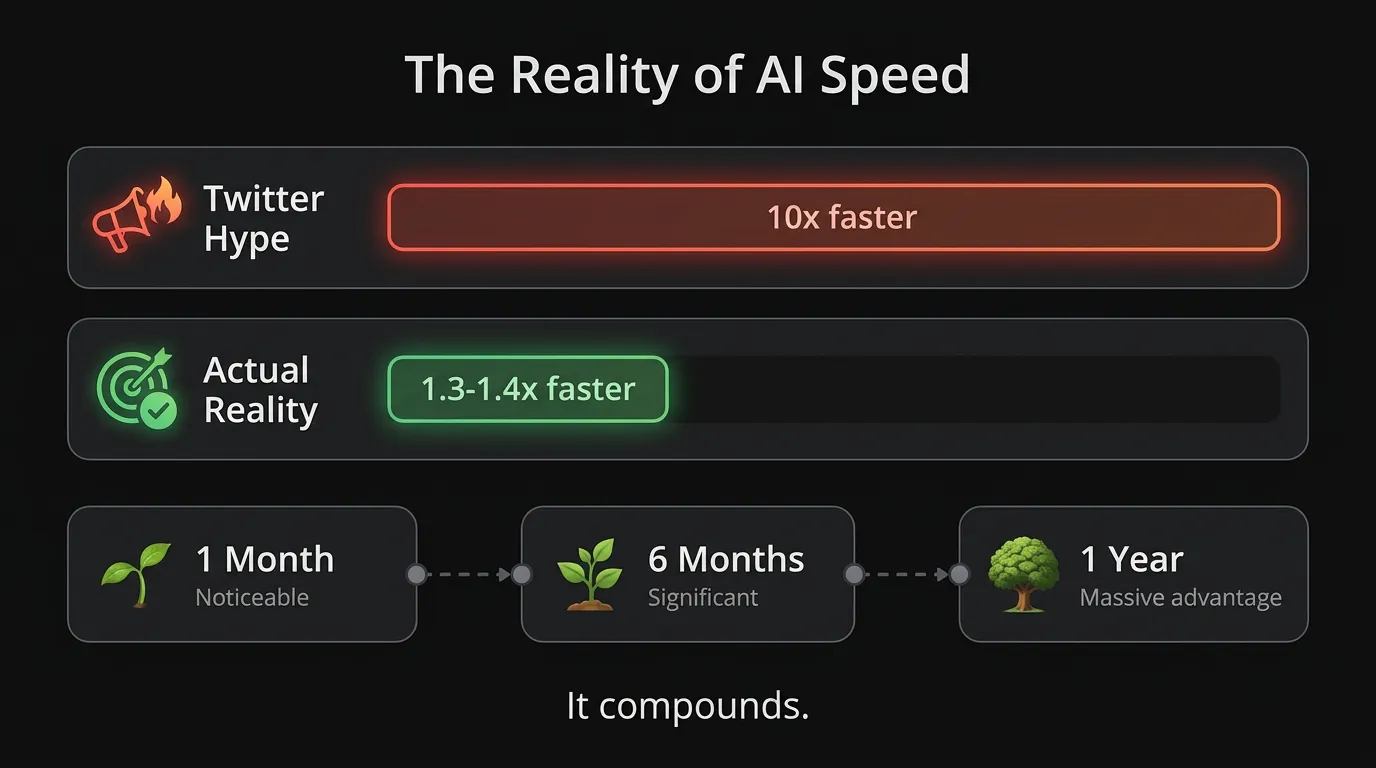
My gut says AI makes me maybe 30 to 40% faster. Not 10x. Not 100x. That's a feeling, not a measurement, and here's why I hold it loosely.
In 2025, a research group called METR ran a proper randomized study. They took 16 experienced open source developers working on their own big, mature repos, and randomly allowed or banned AI tools on 246 real tasks. The tools were mostly Cursor Pro with Claude 3.5 and 3.7 Sonnet.
The result:
- Before starting, developers expected AI to make them 24% faster
- After finishing, they believed it had made them 20% faster
- Measured, they were actually 19% slower with AI
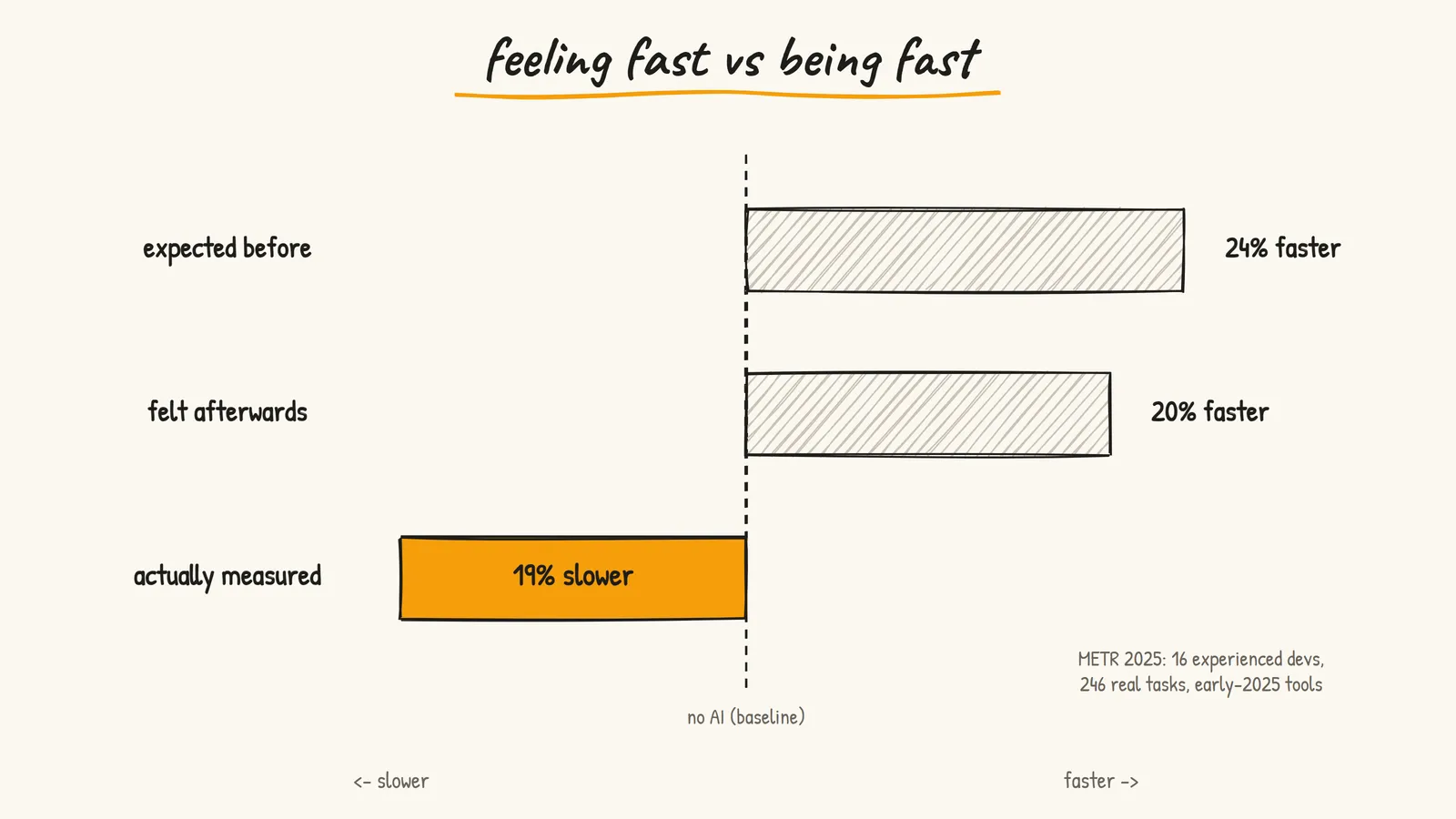
That gap between feeling fast and being fast is the most useful thing I've read about AI coding.
To be fair, it's one setting: experts on codebases they already know deeply, with early-2025 tools. METR ran a follow-up with more developers in late 2025 and saw signs of speedup this time, but they said themselves the results were hard to trust because of how people selected into the study. So nobody has a clean answer yet.
What I take from it:
- Feeling productive is not the same as being productive. Waiting for the AI, reviewing, re-prompting and fixing its mistakes all cost time you don't notice.
- The gains are biggest where you know the least. Boilerplate, unfamiliar code, new libraries. On code you know by heart, you might just be faster yourself.
- Measure your own work. Pick a few similar tasks, do some with AI and some without, and time them. It's humbling.
It still compounds when you use it in the right places. But it only works if you already know what you're doing. AI amplifies skill. If you're good, it makes you faster. If you don't understand the fundamentals, it gives you code you can't maintain.
Learn the craft first. Then use AI to accelerate it.
What I'd Actually Do
If you're starting out with AI in your workflow:
- Pick one editor with an agent and one chat tool. Stop there
- Write a short rules file for your project: stack, conventions, what not to touch
- Use AI first for boilerplate, tests and explaining unfamiliar code
- Use the "where, when, expected, limits" prompt shape for every bug
- Review everything, and hand-review anything touching auth, payments or user data
- Every few weeks, time a couple of tasks with and without AI and be honest about the result
Resources
- Cursor - The AI code editor I use daily
- Claude - For longer conversations and planning
- METR: early-2025 AI and experienced developers - The study from this post
- METR: follow-up update (Feb 2026) - Why the second study is harder to read
- AI SDK - If you want to build AI features into your own apps
- Anthropic Courses - Free courses on prompt engineering
- My harness post - Why the setup around the model matters more than the model
- Prasenjit